Showing posts with label wubi. Show all posts
Showing posts with label wubi. Show all posts
Wednesday, March 22, 2017
Wubi must overcome some hurdles for Edubuntu
Wubi must overcome some hurdles for Edubuntu
From 12.04 you will be able to install Edubuntu with Wubi. There are a few hurdles to overcome. The first is that Edubuntu requires a DVD image to install, and Wubi has built-in checks to prevent this - the ISO must be < 900,000,000 bytes (or 858MB) .
These same checks are what prevents users from installing a normal desktop CD image from a USB stick. These days USB sticks are generally large - in fact the Ubuntu download site states that a minimum of 2GB free space is required when creating a bootable USB.
But the way Wubi works is to copy the entire USB partition as the ISO during the installation, and following that it performs the 900,000,000 byte check, and fails.
There is another danger because the USB partition is copied without any space checks. So imagine if you have 10GB space left on your hard drive, Wubi proceeds to install, but then tries to copy a 16GB USB stick partition onto that same hard drive. (That can only end badly). And even if you have enough space - its going to fail the size check anyway.
Why is this an issue? More and more users are using USB sticks as they are cheaper, readily available and much less hassle than CDs (bad burn anyone?). But even more importantly, there have been reports that the Ubuntu desktop CD ISO will be increased 750MB size from release 12.04 on. This rules out the use of standards CDs. You can still burn a CD ISO onto a DVD - that works because the ISO does not expand to the DVD size in the same way as with a USB partition.
Relevant bugs:
Edubuntu https://bugs.launchpad.net/bugs/913354
USB https://bugs.launchpad.net/bugs/461566
Available link for download

Thursday, December 15, 2016
Tricking Wubi into installing Xubuntu 12 10
Tricking Wubi into installing Xubuntu 12 10
Xubuntu is no longer available on Wubi from release 12.10 and later - as I mentioned here: Xubuntu option to be removed from Wubi. However, there are some people that will want to try it out with Wubi anyway, so heres a way to do it.
Disclaimer: I dont recommend the technique I describe here, but it works fine if thats what you want to do.
It involves downloading two ISOs, one for Xubuntu and another one supported by Wubi. Ill choose lubuntu since its the smallest.
- Dowload the smallest supported ISO: lubuntu-12.10-desktop-i386.iso
- Download xubuntu-12.10-desktop-amd64.iso (I want 64-bit, but you can use 32-bit too)
- Check the xubuntu md5sum (Wubi will check lubuntu, but you need to check xubuntu).
- Download wubi.exe for release 12.10
- Make sure wubi.exe and the lubuntu ISO are in the same folder. Run Wubi and select lubuntu.
- When it tells you to reboot, select "Reboot later".
- Replace C:ubuntuinstallinstallation.iso with the Xubuntu ISO (renaming to installation.iso)
- Mount the Xubuntu ISO and copy initrd.lz and vmlinuz from the /casper/ directory over the one in C:ubuntuinstall
- Edit the preseed.cfg file in C:ubuntuinstallcustom-installation so that it installs xubuntu-desktop instead of lubuntu-desktop
- Reboot the computer
- Select Lubuntu
- Watch Xubuntu install
- Reboot, select Lubuntu and boot into your new Xubuntu install.
Notes:
I used the C: drive for clarity - if you install to a different drive then modify as required.
If it bugs you, you can rename the Lubuntu menu entry to Xubuntu using bcdedit or easyBCD.
Here are some screenshots for selected steps:
?
 |
| Step 3: Check Xubuntu MD5 sum |
?
?
 |
| Step 5: Run wubi.exe with lubuntu in the same folder |
?
 |
| Step 6: Select to reboot later |
?
?
 |
| Step 7a: Delete the existing installation.iso |
???
?
 |
| Step 7b: copy the Xubuntu ISO and rename to installation.iso |
?
????
 |
| Step 8: Mount the xubuntu ISO and copy vmlinuz and initrd.lz |
?
?
??
 |
| Step 9: Set it to install xubuntu-desktop |
??
?
 |
| Step 11: Select Lubuntu |
?
?
 |
| Step 12: Watch it install Xubuntu |
Credit: I got this tip from here ironically to install lubuntu prior to it being supported by Wubi.
Update:
The original post had this line: "This technique will also likely work with other unsupported flavours e.g. ubuntu-studio". It does with one caveat. Ubuntu Studio doesnt include the package required by grub to generate the menu entries that can boot a loop mounted install (lupin-support). So it will install, but you have to manually boot it the first time from the grub prompt and then install lupin-support.
Heres how to manually boot any Wubi install:
search -s -f -n /ubuntu/disks/root.disk
probe --set=diskuuid -u $root
loopback loop0 /ubuntu/disks/root.disk
set root=(loop0)
linux /vmlinuz root=UUID=$diskuuid loop=/ubuntu/disks/root.disk ro quiet splash
initrd /initrd.img
boot
Available link for download
Tuesday, December 13, 2016
Wubi will support Lubuntu in release 12 04
Wubi will support Lubuntu in release 12 04
Lubuntu
Coming with 12.04 precise pangolin, Wubi will support Lubuntu. Preliminary tests using the daily live CD and this wubi.exe are successful. Note you have to logon blind for now while bug 918401 is sorted out.
I found that Lubuntu ran very well on my junky old test laptop - while it was very sluggish with 11.10 Ubuntu. So Lubuntu might be a better option for older machines.
If youre going to be testing Wubi remember to use zsync to keep your test ISOs up to date. Its a great tool.
Other wishlist
Itd be nice if Wubi could install from a USB stick with 12.04 - since the desktop CD ISO is supposed to be around 750MB it wont fit on a CD so I expect many people will try with USB. Waiting on longstanding bug 461566.
Also, itd be nice if some of the obscure error messages that have appeared since 11.10 could be replaced by human-understandable text. For example "WindowsBackend object has no attribute iso-path". I suppose its no better than Permission denied being used indiscriminately, but I suppose we were used to that.
For the preinstalled image install method, Id like to see an easier way to override the kernel boot options for users with ATI or NVIDIA cards requiring nomodeset.
From a personal point of view Id like to have an installable Wubi migration gui app ready - but its not looking like it will happen in time.
Available link for download
Wubi disabled on live CD
Wubi disabled on live CD
I wasnt going to blog about this... but since it made OMG! Ubuntu as a sensational article, Id be remiss not to mention it.
Yes, it was floated on the ubuntu-devel mailing list to disable the ability to install using Wubi on the Ubuntu desktop CD. This didnt receive much discussion and so its unclear what decision was made (if any), but I guess well find out soon enough with just a handful of weeks to go before 12.04 Precise Pangolin is released.
Background
Wubi.exe is released as part of the desktop CD ISO. This is fixed at release. So whenever you download the ISO you are getting the exact same one that others got on the release date... e.g. 11.04 - its been out for a year, lots of updates, but the ISO is the same. Once you install Ubuntu 11.04, youll be downloading 300+MB of patches. But since Wubi.exe is on the ISO its also fixed for the duration of each cycle.
Why is this a problem? Wubi.exe typically gets limited testing during the development cycle. It doesnt get much development either - as the basic function doesnt usually change that much (11.10 was an exception to this). Most of this development tends to be after everything else is frozen, so the testing that was done early in development isnt always relevant. I could come up with other reasons, but you get the point. Youre saddled with whatever bugs there are (some pretty irritating ones) - and even though many people download wubi.exe standalone, its still fixed in stone.
Conclusion
So, in theory this is a great idea. We wouldnt have to live with irritating bugs, and instead of all the volunteers who support Wubi on Ubuntuforums.org having to repeat the same response 500 times, they could spend less effort making sure that the bugs are reported clearly so that a speedy fix can result.
However
Its still kindve nice to hand over a CD to someone and let them try out Ubuntu using Wubi, without having to download anything. I dont know how often this happens, but I guess there will be some who miss it. The question is, do you have to completely disable the CD install method to allow a stable release update to the standalone wubi.exe? Why not support both options?
Available link for download
Monday, December 12, 2016
Wubi for Ubuntu 14 10 doesnt work
Wubi for Ubuntu 14 10 doesnt work
Good news and bad news
Wubi for 14.10 now recognizes and prevents installing on computers with EFI firmware. This saves those users from going through the entire installation and ending up with an obscure
wubildr.mbr error. Thats good and its my patch that has finally been promoted after a 1.5 year delay (for unknown reasons).The bad news is that Wubi no longer works for computers with BIOS firmware either, but youll have to go through the entire installation to find out. This seems to be due to a
libparted issue in the latest version of ubiquity (Ubuntus main installer).So, as per my previous advice... avoid Wubi. But if you must use it, dont use 14.10s Wubi and instead see my previous post on how to install 14.04.1 Wubi.
Available link for download
Monday, November 21, 2016
ubuntu IRC channel logs for Jan 2013 Lines containing Wubi
ubuntu IRC channel logs for Jan 2013 Lines containing Wubi
[03:30] <bazhang> acu, is this a dualboot? a wubi install? or standalone ubuntu

[04:18] <jman> so yeah i had ubuntu booting successfully after doing a wubi and for some reason today i got a grub prompt

[04:20] <cfhowlett> jman, why wubi?  wubi is for TESTING ubuntu according to the developers.  It is not intended as a long term storage option.  Better to virtualbox or, ideally, dual boot ...

[13:47] <FlowRiser> cant even boot of usb because of password, cant install from wubi ... im stuck using windows

[13:47]  * cfhowlett *wubi*  shudder ...

[13:50] <cfhowlett> hambone2, ubuntu for windows is wubi.  Not recommended except for testing ubuntu

[13:59] <FlowRiser> BluesKaj, i tried booting of cd, usb, wubi, assisted boot, parting a partition and installing manually on that (didnt have enough permisiions to do that)

[23:53] <lolcat> How may I mount a wubi .disk image?

[23:53] <C4zz1dy> wubi is an .exe installer

[06:54] <Nerdshank> think wubi would work good?

[06:55] <Tex_Nick> Nerdshank : UEFI might be an issue for you ... and wubi is usually a poor choice

[08:53] <majnoon> wubi prob be better i think for that then

[08:54] <ikonia> wubi would be the worse possible solusiton

[08:54] <majnoon> though i DID find one problem with wubi and windows 8 (not a major one)

[08:55] <ikonia> majnoon: no-one is asking about wubi

[14:31] <p1l0t> ikonia This is installed on the harddrive but I did do a wubi instead of wiping the whole harddrive like I usually do

[14:31] <ikonia> p1l0t: why would you do wubi if youve removed windows 7 ?

[14:32] <Guest78516> im going to wubi lucid then

[14:40] <ikonia> p1l0t: I have no idea, as I dont know your wubi setup, but a clean install will not be a problem as you describe

[17:20] <escott> sorbanos_, keep in mind he is using wubi

[20:16] <m0ntra> I installed using wubi

[20:18] <MonkeyDust> wubi :(

[20:23] <m0ntra> https://sites.google.com/a/landymann.co.uk/landy-mann-online/tech-tips/keeping-windows-7-and-wubi-folders-synced

[02:23] <DaemeonZane> Need some help. Im uding WUBI to install 12.10, and Ive gotten hung up. Output is as follows: ubuntu kernel: [840.440194]  [<c15d04fe>] kernel_thread_helper+0x6/0x10

[10:32] <meet> ok should i go for the wubi installation or dual boot

[10:32] <meet> on wubi

[10:33] <domie> wubi is just awesomesauce in my opinion

[10:33] <cfhowlett> meet: wubi is intended for ubuntu testing, not long-term installation.

[10:34] <meet> i have been using wubi based installation for nearly an year now.. i have a separate drive for that even if its not needed..

[10:39] <domie> meet, if you are still doing a wubi installation, then just backup the current folder where you have it installed, uninstall it, and install the new one

[10:44] <domie> has anyone tried wubi and normal install on the same machine and noticed any performance differences?

[10:45] <usr13> domie: wubi is a pseudo system.

[10:46] <meet> usr13: i currently have 12.04 using wubi

[10:47] <domie> usr13, i was just wondering if there are advantages to a normal install that would make me switch from my wubi install

[10:48] <meet_> usr13: i currently have 12.04 using wubi...but it is  quite buggy.. makes m e switch over to win7 immediately within 10 min!!

[10:48] <usr13> meet_: I dont doubt it. wubi is just a pseudo system.

[10:49] <cfhowlett> meet: consider: wubi creates an ubuntu "image" that is subject to all the breakages that plague windows.

[10:49] <meet_> while uninsstalling wubi.. i just remove it from windows like any other program right? usr13

[10:51] <cfhowlett> meet: see https://wiki.ubuntu.com/WubiGuide#Uninstallation

[12:32] <worm> My Ubuntu 12.10 (installed via wubi) cant start up. It stucked after loaded modem-manager and started bluetooth, mDNS daemon. What can I do to fix that?

[12:44] <worm> Ubuntu 12.10 installed via wubi. Just Ubuntu with everything default.

[12:48] <MonkeyDust> worm  dont use wubi, its meant for testing ubuntu, better install wubi on its own partition, outside windows

[12:48] <MonkeyDust> worm  dont use wubi, its meant for testing ubuntu, better install ubuntu on its own partition, outside windows <- correction

[12:48] <cfhowlett> worm: if youre unsure you want ubuntu, test it in wubi or in virtualbox.  for long term installation, consider dualbooting

[12:49] <worm> MonkeyDust: Actually I am not the one who installed that system... It is my classmate and he just read some guidelines or suggestions and finished installation via wubi. He dont want to re-install the system D: Any other solutions?

[12:50] <MonkeyDust> worm  what im saying is: wubi is not a real installation

[12:56] <MonkeyDust> worm  start here https://wiki.ubuntu.com/WubiGuide

[13:25] <MonkeyDust> worm  wubi is a very limited test-installation

[13:28] <MonkeyDust> worm  https://wiki.ubuntu.com/WubiGuide#How_can_I_make_a_backup_of_my_Wubi_install.3F

[13:29] <worm> MonkeyDust: I see and that is only the thing I can do if he still use wubi. However as you suggest us not to use wubi, that become a problem. Any way to back-up the system if it is installed into a hard drive?

[13:30] <MonkeyDust> worm  im out of ideas for wubi, maybe someone else can help

[05:47] <PatrickDickey> orbitwhite: are you thinking about the wubi install maybe?

[06:07] <logi> do you recommend using the Wubi?

[06:07] <undefined_> im using wubi

[06:07] <zebaszp> logi, wubi is somewhat unstable and has lower performance compared to a full ubuntu installation

[06:08] <PatrickDickey> undefined_: Im sorry. :) (wubi is bad). Still the folder will be in your home folder. cd ~/.xchat2/

[06:08] <orbitwhite> who on earth needs wubi, just asking of curiousity

[06:09] <bazhang> !wubi | logi have a read then

[06:09] <ubottu> logi have a read then: Wubi is an Ubuntu installer for Windows users that allows you to install and uninstall Ubuntu like a Windows application, in a simple and safe way. http://wubi-installer.org/support.php and https://wiki.ubuntu.com/WubiGuide for troubleshooting. Please  file bugs at http://launchpad.net/wubi/+filebug. For Ubuntu Oneiric/11.10 http://releases.ubuntu.com/oneiric/wubi.exe

[06:10]  * PatrickDickey I havent seen anyone successfully use wubi..  But thats just my .02 worth.

[02:03] <zg> (I used wubi to install ubuntu)

[02:04] <dr_willis> most people in here learn to avoid wubi. ;)

[02:04] <dr_willis> theres tools out there to convert a wubi install to a hd install

[02:04] <bentinata> huh, I use wubi, but my system on ext4

[02:05] <dr_willis> wubi installs into a file thats got ext4 INSIDE the file. mounted via the loop  back features

[02:07] <bentinata> dr_willis, if I format the disk with wubi

[02:08] <bekks> bentinata: You do not format any disks using wubi :)

[02:08] <dr_willis> bentinata:   wubi installs ubuntu to a file on the windows drive.. not sure what you  formated..

[02:09] <bentinata> I booted with an USB stick, its wubi right?

[02:09] <bentinata> or wubi is just installation on windows?

[02:09] <magiK_> bentinata, no wubi is ran from inside windows

[02:09] <magiK_> bentinata, do not use wubi it is very slow

[02:10] <dr_willis> well wubi installs from insode windows.. but you boot the wubi install and are not RUNNING wubi inside windows.

[02:10] <magiK_> dr_willis, Even so wubi is significantly slower

[02:11] <magiK_> dr_willis, I use to run ubuntu through wubi and it fragmented my hd so fast its not even funny

[02:12] <dr_willis> i dont use wubi. so i dont worry about wubi

[02:12] <bentinata> why people use wubi? basic installation isnt so difficult

[02:12] <dr_willis> i keep waiting for wubi to get removed from the  disks

[02:12] <magiK_> dr_willis, ;) yeah wubi is cool just for someone to try out and see if they will like ubuntu

[04:01] <dr_willis> windows installer is wubi

[04:01] <jake_> yes i used wubi

[04:02] <dr_willis> avoid wubi

[04:04] <dr_willis> jake_: the installer will not remove a wubi install

[04:04] <bazhang> jake_, not with wubi, no. add/remove in windows to remove that wubi

[04:04] <jake_> how do i remove a wubi install?

[04:08] <dr_willis> wubi is in the windows add/remove programs list

[08:56] <somsip> chamunks: colinux, cygnix, wubi, dual-boot, ubuntu only. That was my way

[19:32] <angs> I installed wubi a month ago. Recently when ubuntu 12.10 is started, I dont have any network interface working. During the start up I get "booting system without full network configuration" warning. how can I solve the problem?

[22:09] <Niyakun> can the newest ubuntu run under windows 8 using wubi?

[22:09] <daftykins> Niyakun: i would highly recommend never even thinking of using WUBI

[06:32] <dr_willis> Stephini:  thats a wubi install.. and tends to be problematic.. i would suggest not using wubi

[14:01] <Ratheka> Can the wubi installer completely clear an existing drive instead of splitting it?

[14:02] <BluesKaj> !wubi | Ratheka

[14:02] <ubottu> Ratheka: Wubi is an Ubuntu installer for Windows users that allows you to install and uninstall Ubuntu like a Windows application, in a simple and safe way. http://wubi-installer.org/support.php and https://wiki.ubuntu.com/WubiGuide for troubleshooting. Please  file bugs at http://launchpad.net/wubi/+filebug. For Ubuntu Oneiric/11.10 http://releases.ubuntu.com/oneiric/wubi.exe

[14:05] <BluesKaj> Ratheka, wubiwont clear any data off a drive or partition , it only exists as a file within windows

[14:05] <nearst> ive some question, wubi allow me to boot linux and chroot fs ? ive no usb drive for boot my lost mbr

[17:33] <Grandpa_smashy> Did you use wubi?

[19:53] <k1l> teazel: the wubi (windows installer) installs the ubuntu into a container inside the windows system. i dont know how to recover that. and honestly i would recommend to make a native install

[19:56] <FlowRiser> BroUnicorn, i wont have that problem lol, im using wubi

[19:58] <teazel> k1l: eh I will probably just use Wubi. Thanks though

[19:59] <k1l> teazel: wubi causes alot of problems that dont appear on native installs. so most user recommend a nativ instal

[20:10] <FlowRiser> I have a problem, i used wubi to install ubuntu 12.04; the unity-greeter shows another username, i can still log in using ctrl-alt-f1 using my own username, but i have no ideea how to turn on the gui stuff; How do i turn on the gui stuff (unity+compiz) ?

[22:06] <alabala> Hi can someone give me a link from where I can download wubi

[22:06] <iceroot> alabala: http://releases.ubuntu.com/precise/wubi.exe

[12:13] <cfhowlett> famax8, wait, you used the windows installer?  wubi?

[12:53] <raddy_> wubi method is very slow

[12:53] <ThinkT510> raddy_: avoid wubi

[12:54] <cfhowlett> raddy_, wubi should be your LAST resort.  DEAD last.

[18:48] <addi> hey guys, does the WUBI installer for Ubuntu 12.10 not work on Windows 8? fails to open for me :X

[18:48] <Eldrek> addi I have found that wubi doesnt work with UEFI

[18:49] <MonkeyDust> addi  dont try wubi, youll get frustrated

[18:50] <vfw> addi: Not sure if it does or not, but I would recomend a real insall, either on a USB drive or an internal one. wubi is ok, sort of and sort of not so ok, its just for demo purposes IMO

[18:51] <addi> just that Ive installed Mint a lot of times through WUBI, so wanted to make sure if Windows 8 was the problem

[20:20] <MonkeyDust> Devaki  dont use wubi

[20:20] <Devaki> whats wubi ?

[20:21] <MonkeyDust> Devaki  wubi is the windows installer and i dont have facebook myself :)

[20:21] <dpurgert> Devaki, wubi is the Windows-based Ubuntu installer ... thing

[20:25] <Devaki> then wubi it is !

[22:30] <SonikkuAmerica> adro_: If its a Wubi install, youll find your Windows stuff under the /host/ folder

[01:02] <kunji> bubba99: Ubuntu uses the linux kernel.  It is possible to run it in a virtual environment that might have a different host OS, for instance in VMWare.  Or are you asking about the Wubi installer?  Im not exactly sure how the Wubi installer works.

[06:21] <cfhowlett> neil098, by any chance did you use the windows/wubi installer?

[15:43] <SonikkuAmerica> chris154, how do you plan to install it, Wubi or separate?

[18:00] <joe9> I tried to install ubuntu with the wubi_install.exe. The installation instructions use C:/ to install. I installed it to the D: drive as my C: does not have enough space.

[18:03] <joe9> or, could the wubi_install.exe change the boot sector of the D:/ drive whereas the BIOS uses the C:/ drive to boot.

[18:10] <jhutchins_wk> joe9: Sorry, no knowledge of wubi.

[18:11] <joe9> jhutchins_wk: any suggestions on where I can find the wubi questions answered?

[18:12] <l057c0d3r> joe9 sorry missed your question.. what was it??  i have a wubi install and know a bit about it

[18:13] <joe9> l057c0d3r: i installed wubi to D: drive, but, on reboot, I do not see the grub menu. It directly boots into windows.

[18:13] <joe9> will the wubi install update the mbrs of all disks?

[19:25] <joe9> my wubi installation keeps failing with this message: http://codepad.org/2MoQyJ3u

[20:03] <jjason> anybody know if wubi can handle trim yet?

[20:06] <jjason> bekks: since win7 i have just used wubi, but now i have an ssd..

[21:15] <ActionParsnip> Funky: strange. are you using wubi at all?

[21:16] <MonkeyDust> wubi :(

[21:16] <ActionParsnip> Funky: good, wubi is awful

[23:52] <ActionParsnip> cooflar_: did you install using wubi?

[23:55] <ActionParsnip> cooflar_: no idea why that isnt default, I always advise it. It is the ONLY good thing about wubi imho

[23:57] <cooflar_> ActionParsnip: So the next question :P Is nautilus the default file browser? Or do i need to download it? Well I probably have somewhere, but couldnt find it. Theres alot of downsides using wubi?

[13:23] <cfhowlett> Guest29043, you mean the wubi/windows installer?

[13:24] <cfhowlett> Guest29043, fyi, wubi is designed for testing ubuntu, not long term installation.  If you want windows and ubuntu, Id urge you to consider virtualbox or dual booting.

[15:49] <PokemonAcer> Hey, did you know that if you use wubi from the discs you can send of for, you CANNOT install it with windows

[15:49] <PokemonAcer> You have to download the wubi installer from ubuntu.com

[15:50] <|nv|s|b|e> lol, using wubi is like towing a mack truck with a volkswagon

[16:24] <habstinat> I tried to install Ubuntu (or rather, Edubuntu) via Wubi but it failed. Here is the logfile: <http://paste.ubuntu.com/1582651/> What could be causing it to fail? How can it be fixed?

[23:28] <Tex_Nick> wingman182 : have you looked at ... https://wiki.ubuntu.com/WubiGuide

[00:40] <PatrickDickey> !wubi | rdp1408 The information here might help you to troubleshoot your installation.

[00:40] <ubottu> rdp1408 The information here might help you to troubleshoot your installation.: Wubi is an Ubuntu installer for Windows users that allows you to install and uninstall Ubuntu like a Windows application, in a simple and safe way. http://wubi-installer.org/support.php and https://wiki.ubuntu.com/WubiGuide for troubleshooting. Please  file bugs at http://launchpad.net/wubi/+filebug. For Ubuntu Oneiric/11.10 http://releases.ubuntu.com/oneiric/wubi.exe

[04:45] <MrGizmo757> dose Wubi work ok with Windows 8 Pro? has anybody tried it?

[04:45] <magn3ts> MrGizmo757, do you *really* want wubi? ask yourself that first.

[04:46] <tylerwoodward> I wouldnt recommend Wubi either. If you burn the ISO itll let you install it next to Windows 8.

[04:47] <MrGizmo757> i alredy have windows 8.  i had driver issues with this current vertion of ubuntu and i found a PPA that might fix it. i just wanted to do it with Wubi incase it didnt work. if this postential fix dose work then ill go for the full install.  thats what my plan is anyways.

[04:49] <MrGizmo757> Wubi just seemed like a better option for testing since it can easily be removed if it fails. thats what im thinking anyways

[04:50] <Marcin_> Wubi is for Newbi.s :P

[06:00] <Noskcaj> koveras0927, Wubi?

[01:54] <thalib> the error is c:usersownerappdatalocal empwubi-12.10-rev273.log

[01:55] <devnull_> oh wubi

[01:55] <ActionParsnip> thalib: so you are using wubi?

[01:55] <ActionParsnip> thalib: why did you not say you were using wubi?

[01:56] <ActionParsnip> thalib: yes, if you open the USB stick in windows it will offer you wubi

[01:56] <devnull_> i would say ... only use wubi if you have to ... not sure if you have to or not

[01:56] <ActionParsnip> thalib: oh hell no, wubi is nasty

[01:57] <ActionParsnip> thalib: I recommend you use add/remove programs to pull wubi off

[01:59] <HonestAbe> oh man, I remember my first linux install, it was a migrated wubi install on a netbook, what a nightmare.

[02:09] <ActionParsnip> thalib: did you uninstall wubi?

[02:10] <thalib> and also i just want to tell the ubuntu that was downloaded has wubi on the usb stick

[02:42] <aartist> dr_willis: I am on laptop... with intel machine and installed ubuntu via wubi. and works good everyday. I can reboot and it may work fine.. but I like to make it working without rebooting.

[02:43] <HonestAbe> not necessarily to fix whatever problem, but wubi installs are problematic to say the least

[09:09] <krz> does the wubi installer do everything, if i were to install from a cd?

[09:10] <dr_willis> krz:  most peoplr avoid wubi. it can be flakey

[09:13] <krz> no limitations, as noticed with wubi?

[09:15] <Sehnder_> Although even using the wubi installer had issues- it cant complete copying to the drive I designate

[09:16] <MonkeyDu1t> Sehnder_  yes, wubi is very limited, better not use it

[16:29] <madwilliamflint> Morning everyone.  Is there a significant performance hit for a wubi install given that its installing over the top of ntfs?

[22:02] <Slart> kunji: ahh.. its a wubi thing?

[19:59] <Wizek> Hello! I have a fresh wubi install of Ubuntu 12.10 x64 and try to install 32bit apps (such as skype and steam) but I get this error: "Wrong architecture (i386)". I googled a bit, and found that I need ia32-libs, however trying to install it yields: ia32-libs : Depends: ia32-libs-multiarch but it is not installable. What can I do now?

[20:00] <MonkeyDust> Wizek  wubi may be the problem, its meant for testing ubuntu -- better install ubuntu on its own partition

[20:04] <Wizek> MonkeyDust: that doesnt seem right. Why would wubi have an effect on wheter apt-get sees a package or does not?

[20:05] <MonkeyDust> Wizek  what im saying is: instead of struggling with wubi, do a real ubuntu install

[20:06] <Wizek> MonkeyDust: what would you recommend if this error was on a non-wubi system?

[20:40] <MonkeyDust> Wizek  its only wubi, not much lost if things go wrong, give it a try

[20:50] <Wizek> MonkeyDust: I owe you an apology. It does have to do with wubi, so sorry for doubting you on that one. But, fortunatelly, there was a very easy solution: "sudo dpkg --add-architecture i386" ia32-libs is installing right now, fingers crossed for skype and steam :) after that

[23:16] <jrtappers> vinceakavince, why not wubi?

[23:17] <jrtappers> vinceakavince, OH yh, XP = no wubi, sorry

[08:08] <Geet> hi.. I used ubuntu using wubi for over 12 months now.. thought that was the safest way to try it out.. but now that i have done it i would like to dual boot my system with win7.. so is the wubi installation convertable to a dual boot?

[08:12] <mh`> http://askubuntu.com/questions/635/how-to-convert-wubi-install-into-regular-install

[08:15] <XRS1> did not know about that wubi move script

[10:44] <MonkeyDust> Cur10u8  thats called wubi

[10:44] <MonkeyDust> Cur10u8  wubi is meant not a real installation, its for testing purposes, better install ubuntu on its own partition

[10:45] <warfar> lol i installed wubi on its own partion

[10:48] <MonkeyDust> Cur10u8  i have not enough experience with wubi, sorry, and i do not advice to use it

[10:50] <MonkeyDust> Cur10u8  https://wiki.ubuntu.com/WubiGuide#How_can_I_make_a_backup_of_my_Wubi_install.3F

[10:54] <Cur10u8> @MonkeyDust how can i install ubuntu on my pc without wubi?

[10:57] <warfar> but this happened after i made a new wubi disk

[10:58] <ActionParsnip> Warfar: are you using wubi now?

[11:02] <warfar> ActionParsnip, my wubi is on a seperate partion than windows

[11:04] <ActionParsnip> Warfar: and, if you installed wubi on a different partition to Windows, why not do a proper install?

[15:49] <nemos> kylescottmcgill: no i dont. I tried to install it with wubi but it cannot see the install file after reboot so i am trying this instead

[19:47] <__Alex_> Hello, could someone using Wubi post me his /boot/grub/grub.cfg in a pastebin? Im interested to see how it works

[19:49] <__Alex_> Or can someone explain me in-depht how wubi works, and how I can make grub emulate a disk, not just saying "It emulates a disk"?

[21:29] <Maverick_Hunter> everytime I install via wubi or boot via liveCD my system freezes

[21:30] <ActionParsnip> Maverick_Hunter: why use Wubi?

[21:30] <Maverick_Hunter> ActionParsnip: I used wubi because LiveCD failed, I have an Nvidia 8600GT

[21:33] <ActionParsnip> Maverick_Hunter: it will be what is causing the issue with the live CD and you can use a real install instead of nasty Wubi

[01:27] <Shayde> Im using wubi to install ubuntu on my windows 7 computer but i keep getting an error when i first select ubuntu from the boot options saying: "error: cannot read /dev/sda : Input/output error" followed by a different colored screen with "Invalid ROM contents, no valid vbios image found" then it goes into the ubuntu splash screen that says "checking disk drives for errors"

[01:33] <Shayde> This error is saying Invalid ROM contents, no valid VBIOS image found when I am trying to install ubuntu through wubi

[01:47] <Shayde> :D Alright so Im trying to install ubuntu 12.10 using wubi on my windows 7 laptop, everything goes fine until when i boot into it, it repeats this error: "error: cannot read /dev/sda : Input/output error" followed by a different colored screen with "Invalid ROM contents, no valid vbios image found" then it goes into the ubuntu splash screen that says "checking disk drives for errors"

[01:51] <Gerowen> Shayde: Ive heard of some people having issues with Wubi on some hardware.

[02:31] <mechlior> Does anyone know if there are issues with ubuntu connecting to the net if you use wubi to install?

[02:33] <dr_willis> mechlior:  wubi has lots of issues.. but the drivers and networking shoul dbe the same as a normal install

[02:33] <mechlior> Im sorry, i installed ubuntu 12.10 via wubi and the network connections find my ethetnet port and show a mac address, but keeps sayin that my wired connection is disconnected.  I reboot back into windows and the internet is running fine.

[08:07] <photon> Hello I had installed ubuntu with wubi but I was running out of space. So I uninstalled it and burned a copy of ubuntu on a cd and tried to install it with split partition. It was going well but then towards the end it told me that the disk was corrupt

[08:08] <photon> I cant even install Wubi again

[08:08] <dr_willis> wubi installs to some directory on the c:  see if its still there.   I dont recall its name

[09:48] <dr_willis> the .exe would be a wubi insgtall.. its best to avoid wubi

[12:41] <apos> Mathias,  what do you mean install it in windows? you meen wubi?

[12:41] <Mathias> apos: doesnt wubi mess with windows bootloader?

[12:42] <apos> Mathias,  wubi installs linux as if it is a windows application

[22:22] <auronandace> bibi23: avoid a wubi install, not worth the hassle

[22:22] <escott> bibi23, i would recommend not using wubi

[22:24] <k1l> bibi23: dont use wubi :/

[22:25] <damselfly9> some reports suggest wubi not working from win 8

[02:13] <compile> Im trying to install 12.10 using wubi

[23:23] <SonikkuAmerica> Big problem: Anytime I try to play a video ANYWHERE in Ubuntu 12.10 64-bit under Wubi, I get snow along with the picture. Any ideas?

[23:26] <SonikkuAmerica> (2) Big problem: Anytime I try to play a video ANYWHERE in Ubuntu 12.10 64-bit under Wubi, I get snow along with the picture. Any ideas?

[07:04] <FlowRiser> wald0, wubi installer

[07:16] <dr_willis> wald0:  if you mean the tool that installs ubuntu INSIDE windows into a  full session on the windows Hard drive.. that would be  wubi

[07:24] <mechelle69> files are .disk, casper, install,preseed, boot, dists, isolinux, pool, and some documents: md5sum, autorun, readmediskdefines, and wubi

[16:01] <seel> speaking of installing, whats the difference between wubi and dual-booting?

[16:01] <BluesKaj> !wubi | seel

[16:01] <ubottu> seel: Wubi is an Ubuntu installer for Windows users that allows you to install and uninstall Ubuntu like a Windows application, in a simple and safe way. http://wubi-installer.org/support.php and https://wiki.ubuntu.com/WubiGuide for troubleshooting. Please  file bugs at http://launchpad.net/wubi/+filebug. For Ubuntu Oneiric/11.10 http://releases.ubuntu.com/oneiric/wubi.exe

[16:01] <MonkeyDust> seel  wubi creates a space inside windows, dual-booting alongside windows

[16:02] <ThinkT510> seel: wubi is a ubuntu installation in a file inside windows (avoid using it if possible)

[16:03] <seel> ThinkT510: well, Im using wubi atm as I cant install ubuntu on here

[16:03] <ThinkT510> seel: wubi was never meant as a long term solution, more of a testing ground before a proper install

[16:04] <BluesKaj> seel, wubi isnt a real install , its afile the runs in windows

[16:07] <seel> so does wubi still allow windows to get something like a virus or any other crap using windows might have happen?

[16:07] <xente> seel: no, not if you are booting ubuntu in wubi

[16:08] <MonkeyDust> seel  wubi will get you frustrated, its a pseudo-install, youll think ubuntu is no good

[16:08] <xente> wubi is a great solution, but bad disk performance

[16:08] <k1l> seel: i recommend to avaoid wubi

[16:08] <ThinkT510> seel: if wubi has access to your windows partition then yes, files (including viruses) can get transfered to windows

[16:09] <denisnikulin> seel: no, any virus from windows wont affect your wubi ubuntu installation

[16:09] <k1l> wubi installs a ubuntu into a container into the windows partition. i recommend to do a native ubuntu install on seperate partitions

[16:10] <xente> the problem with wubi is limited to poor disk performance, file system corruption if there is a crash (on both the windows side and linux side) but other than that, its just fine.  a native install has much better disk performance. other than that, its just fine

[16:13] <k1l> xente: most supporters here dont like wubi because of that problems. they are quite common. thats what i mean. its theoretically a good feature.

[16:28] <seel> and even though is required to login to windows (grr lol) its better than wubi though a dual-boot is obviously the best choice other than a full install?

[16:32] <arunkumar413> BEC: yes i installed ubuntu inside windows (wubi)

[16:34] <BEC> arunkumar413, honestly I never tried wubi; just a sec

[16:39] <BEC> check this: http://www.psychocats.net/ubuntu/wubi

[16:39] <BEC> arunkumar413, you dont have to make a new partition; only free some space & use it from the wubi installer

[16:40] <BEC> arunkumar413, also heres the ubuntu community page:https://help.ubuntu.com/community/Wubi

[02:05] <Sylphie> Dammit you mean something like wubi?

[02:06] <Dammit> the .iso is whre the wubi shouls be

[05:30] <cfhowlett> BroUnicorn, *wubi* shudder.  FYI: wubi is for TESTING ubuntu, not long term installation according to the developers.  Dual booting is the preferred method.  To fix the windows boot you need to use the windows disk and "repair/recover"

[05:32] <memand> I must say that I have never used wubi, so Im on bare ground here...

[05:34] <memand> BroUnicorn: Is there a specific reason you installed it with wubi? And Is there anything very critical you dont want to loose on the drive?

[05:37] <memand> BroUnicorn: Again I dont have experience with wubi, but it sounds like a fair assumption

[05:38] <memand> cfhowlett: do you know how wubi actually works?

[05:40] <memand>
Available link for download
Wednesday, November 9, 2016
Wubi pulled from Natty Alpha3
Wubi pulled from Natty Alpha3
For those hoping to test Natty Narwhal 11.04 using Wubi, it will not be fixed in time for Alpha3 (the bug report is available here). The new target for a fix is Beta1.
If you read my previous posts, you will know that you could install Alpha1 with Wubi (with some workarounds), but with Alpha2 a new ubiquity bug prevented this from working. I havent tested this lately, so I dont know whether ubiquity has been fixed. But its safe to assume that the only option now for Wubi Natty testing is to install Maverick 10.10 and then upgrade.
It shouldnt really be a surprise. Wubi is intended for the newcomer to Ubuntu so having a working Wubi option early in development is not a top priority. Although I am puzzled what the major difficulty is. Also, the fact that there are so many major changes to grub and ubiquity between Maverick and Natty should be sobering for those that like to upgrade to each new release (these dont seem to be very stable products). When you also factor in the major changes to the front-end (Unity) and it seems to me that the Ubuntu developers are being stretched pretty thin. At the same time thereve been some pretty major bugs in Lucid that have gone unpatched for over a year.
Wubi itself is due for an upgrade. With a 2007 version of grub4dos that hangs up on ext4 partitions, and some pretty bad usability bugs (e.g. the python code that chokes on multimedia card readers) and confusing (meaningless) error messages... someone needs to step up.
Available link for download
Friday, October 14, 2016
Wubi development and customisation
Wubi development and customisation
Wubi is managed by the Ubuntu-installer team. But you can still fix bugs and submit it to them to review, approve and merge. Or if you just want to create your own version of Wubi... how do you go about it?
To start off I am using a vanilla install (so I dont miss any steps). It happens to be a Wubi install, but this doesnt matter.
1. Preparing your machine
Install some packages that youll need to get started:
sudo apt-get install packaging-dev
This involves registering on launchpad.net, signing their code of conduct (which involves creation of a GnuPG key), adding an SSH key (which youll need if you want to push your code back to launchpad). You can find help for this on launchpad itself.
3. Identifying yourself
You should now have GnuPG and SSH key setup. Identify yourself to the debian packaging tools by adding the following lines to your .bashrc:
e.g.
export DEBFULLNAME=bcbc
export DEBEMAIL=openbcbc@gmail.com
To make the change take effect run:
source ~/.bashrc
First identify yourself to bzr (and launchpad):
e.g.
bzr launchpad-login bcbc
bzr whoami "bcbc <openbcbc@gmail.com>"
If youre working on the development release you can download it using:
bzr branch lp:wubiIf you want a production release e.g. precise, instead use:
bzr branch lp:~ubuntu-installer/wubi/precise
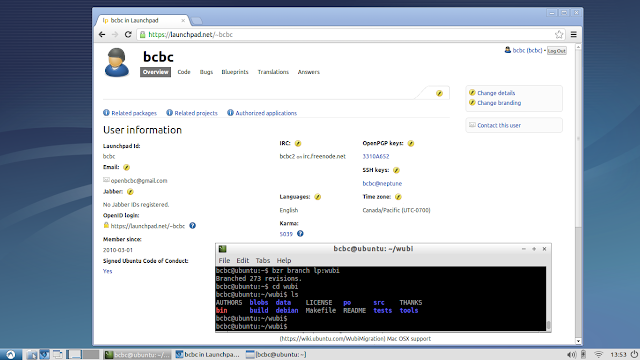
This will confirm the RSA fingerprint on the server and ask you to unlock your own SSH key; then download the code. Now you should review the README and compile wubi.exe because the first time you do it, it installs and configures wine and other software you require (there is a lot to install, when prompted accept the defaults except for a few things like accepting the EULA):
make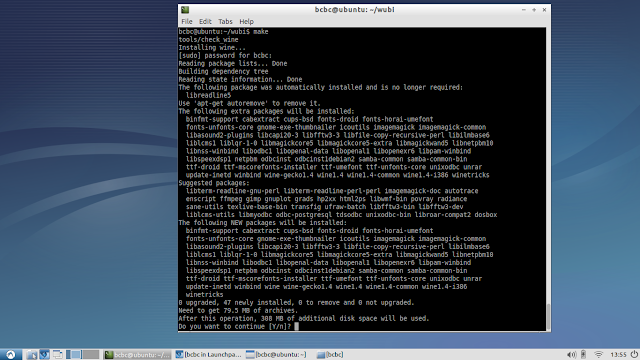
So in this case Im going to fix a really easy bug. This affects 12.04.1 wubi.exe (but Im fixing it in the dev branch 13.04). It doesnt matter, it will have to go in there as well. The problem is that with long term releases, not all flavours of Ubuntu get updates. So while there is a 12.04.1 release of Ubuntu/Kubuntu/Edubuntu etc., there isnt one for Lubuntu. And the 12.04.1 version of wubi.exe wont install a 12.04 version of Lubuntu.
There is a check that allows a 12.04 version of wubi.exe to install a 12.04.1 release, but I believe thats an error - it should be the other way round.
So, lets find the bug and the affected code. Heres the bug: https://bugs.launchpad.net/wubi/+bug/1043607 and heres the relevant output:
08-29 21:38 DEBUG CommonBackend: Checking C:ubuntuinstalllubuntu-12.04-desktop-i386.iso
08-29 21:38 DEBUG Distro: checking Lubuntu ISO C:ubuntuinstalllubuntu-12.04-desktop-i386.iso
08-29 21:38 DEBUG Distro: wrong version: 12.04 != 12.04.1
The highlighted part shows you where to find the code: its in distro.py which happens to be in src/wubi/backends/common (search on "wrong version" since the release numbers are variables...) and then make the fix. Heres the diff after fixing.:
=== modified file src/wubi/backends/common/distro.py
--- src/wubi/backends/common/distro.py 2012-04-24 15:57:38 +0000
+++ src/wubi/backends/common/distro.py 2012-10-30 21:17:02 +0000
@@ -166,7 +166,7 @@
 if self.name and name != self.name:
 log.debug(wrong name: %s != %s % (name, self.name))
 return False
- if self.version and not (version == self.version or version.startswith(self.version + .)):
+ if self.version and not (version == self.version or self.version.startswith(version + .)):
 log.debug(wrong version: %s != %s % (version, self.version))
 return False
 if check_arch and self.arch and arch != self.arch:
7. Edit the changelog
You can use dch -i to add a changelog entry. It does some automatic stuff for you, but make sure you correct the release number or it names it 12.10ubuntu1. Otherwise just use your favourite editor. Note: Im not really sure of the convention here - but only the Ubuntu-installer team can merge changes to the main Wubi branch, so theyll sort that out if they have the time to look at it.
So heres what mine looks like:
8. Commit the changes
If you messed up, run bzr uncommit and you can change and recommit. It doesnt remove your changes, just the commit.
9. Push to a new branch
10. Link it to the bug
Go to the page for the branch you just pushed: https://code.launchpad.net/~bcbc/wubi/lp1043607
Now you can link the bug report and open a merge request.
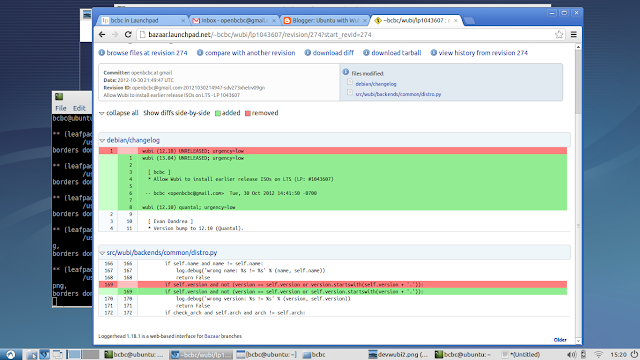
11. Final comment
You probably noticed I forgot to test my patch. Thats not a good idea. So once you have made you changes you should run make again to build wubi.exe. You can find it in the build directory. You can copy that to your Windows machine and test it - or view the README for other test options.
PS. If you want to build a custom Wubi for your own ISO, review the README as well. It tells you what you need to change.
So heres what mine looks like:
wubi (13.04) UNRELEASED; urgency=low

 [ bcbc ]
 * Allow Wubi to install earlier release ISOs on LTS (LP: #1043607)

 -- bcbc <openbcbc@gmail.com> Tue, 30 Oct 2012 14:41:50 -0700
8. Commit the changes
bcbc@ubuntu:~/wubi$ bzr commit -m Allow Wubi to install earlier release ISOs on LTS - LP 1043607Committing to: /home/bcbc/wubi/
modified debian/changelog
modified src/wubi/backends/common/distro.py
Committed revision 274.
If you messed up, run bzr uncommit and you can change and recommit. It doesnt remove your changes, just the commit.
9. Push to a new branch
bcbc@ubuntu:~/wubi$ bzr push lp:~bcbc/wubi/lp1043607
Using default stacking branch /+branch-id/30119 at chroot-74436368:///~bcbc/wubi/
Created new stacked branch referring to /+branch-id/30119.
10. Link it to the bug
Go to the page for the branch you just pushed: https://code.launchpad.net/~bcbc/wubi/lp1043607
Now you can link the bug report and open a merge request.
11. Final comment
You probably noticed I forgot to test my patch. Thats not a good idea. So once you have made you changes you should run make again to build wubi.exe. You can find it in the build directory. You can copy that to your Windows machine and test it - or view the README for other test options.
PS. If you want to build a custom Wubi for your own ISO, review the README as well. It tells you what you need to change.
Available link for download
Subscribe to:
Posts (Atom)