Showing posts with label script. Show all posts
Showing posts with label script. Show all posts
Wednesday, March 29, 2017
Tornado Script 1 1 GTA 5 PC Mods
Tornado Script 1 1 GTA 5 PC Mods
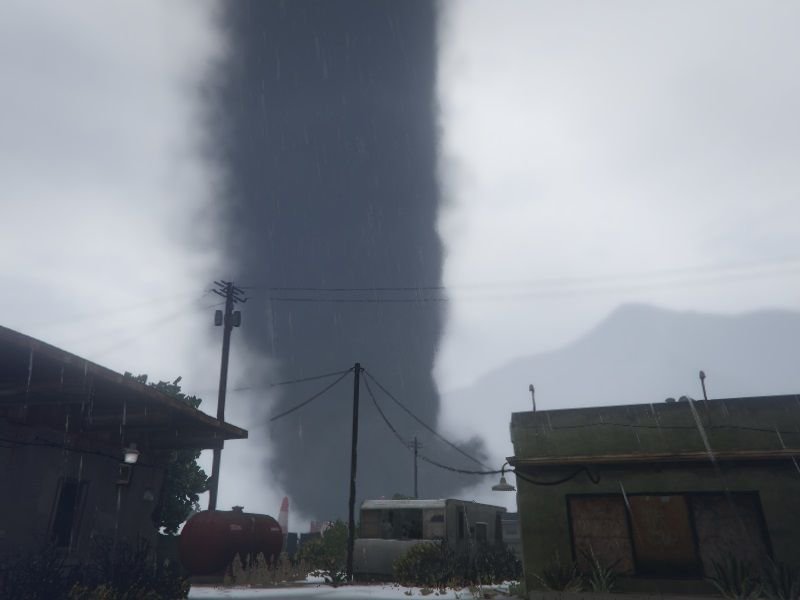
Now for something a little random. I bring you.. Tornado Script. A script that brings a whole new element to stormy weather in GTA V.
With this script installed, it brings the possibility that a violent tornado will spawn in when the weather turns bad.
Tornados can be set to appear naturally during thunderstorms or spawned at your command using a specified keybind.
The INI config file gives you the option to adjust these settings.
Default activation key is the F6 key. (heh)
Keep in mind that this script does not come without a hit to FPS.
It has yet to be tested on low- end machines, but I think its fair to assume that any especially low- end hardware may have issues running this.
I may try to optimize this further in other releases, but for now, that is the downside to installing this mod.
Some ideas im already considering for future releases:
- Fix FPS lag
- Tornados of different size and strength
Changelog
v1.1
- Fix for HUD disappearing.
- Added some sound FX.
If you have any ideas for what you want to see with this mod, please post it below. Thanks (:
--- Prerequisites ---
--- Installation ---
- Create a folder called "scripts" in the main folder where GTA is installed
- Place TornadoScript.dll in the folder
- Place TornadoScript.ini in the folder
Source Code: https://github.com/CamxxCore/TornadoScript
Available link for download

Friday, February 10, 2017
Use an automated backup script that will check your backup drive letter
Use an automated backup script that will check your backup drive letter
I have tried many different tools for automated backup, both third party and the ones built into windows, but the best one by far is Robocopy. It is the most robust, stable and reliable tool that youll ever find to automate backups both in the enterprise environment and at home.
I use Robocopy scripts to mainly create backups onto an external USB drive that can be routinely taken offsite and switched with another external drive.
The biggest problem when using automated backup onto an external drive is the fact that the letter of the drive may change at some point if the drive was unplugged and then re-plugged. This causes your backup procedure to miss the target drive and backup will not run.
Heres an example of a script that overcomes the problem of the changing drive letter.
In this example we run a mirror backup of a server folder onto an external backup drive, and the script will find out whether the backup drive is using drive letter G: or H:
@echo off
IF exist G:ident.txt (goto run1) ELSE goto run2
:run1
robocopy "ServerAdministration" "G:BackupAdministration" /MIR /W:0 /R:0 /XF:SHT /LOG:backuplogr.txt /NS /NC /NFL /NDL /NP
:run2
robocopy "ServerAdministration" "H:BackupAdministration" /MIR /W:0 /R:0 /XF:SHT /LOG:backuplogr.txt /NS /NC /NFL /NDL /NP
IF exist G:ident.txt (goto run1) ELSE goto run2
:run1
robocopy "ServerAdministration" "G:BackupAdministration" /MIR /W:0 /R:0 /XF:SHT /LOG:backuplogr.txt /NS /NC /NFL /NDL /NP
:run2
robocopy "ServerAdministration" "H:BackupAdministration" /MIR /W:0 /R:0 /XF:SHT /LOG:backuplogr.txt /NS /NC /NFL /NDL /NP
We start by creating a procedure that will check for a file called "ident.txt" (could have any other name or extention) - this is an empty file you should create and put in the root folder of your backup drive.
So if the file is present on drive G: - we point the script to a label called "run1" which runs the backup to drive G:. If the file is not present on drive G: (or if there IS no drive G:) we bounce the process to the label called "run2" which will then run the backup onto drive H:.
Robocopy then starts backing up a shared folder called "Administration" located on a server named "Server" onto the the external USB drive.
Available link for download
Subscribe to:
Posts (Atom)