Showing posts with label turn. Show all posts
Showing posts with label turn. Show all posts
Wednesday, January 25, 2017
Turn an IBM X3100 M4 Server into a workstation
Turn an IBM X3100 M4 Server into a workstation

This is a neat little server that comes from IBM that officially doesnt support Windows 7. In this post I will guide you through making it run Windows 7 using the built in LSI Raid controller and a RAID mode.
If you decide to use AHCI mode however, it becomes easier (as it is supported by Windows 7), but you will be missing a performance (or stability) increase youll get with the RAID.
The LSI raid controller on this server does not have drivers that support Windows 7 - only Windows Server 2008 (R2). Theres also a great many driver packages available from IBM for this controller, so choosing the right one is quite time consuming. After 4 different failed driver packages I finally found the right one that would enable the RAID controller inside the Windows 7 installation PE. I have uploaded it HERE.
Just unrar and copy it onto a flash drive and browse to it during the installation (when it fails to find any hard disks).
Once the system finishes installing - most of the drivers will be installed, the only ones that wont be are the Chipset and the onboard video (Matrox G200ER2). Download the driver for it here.
Chipset drivers are available here.
Available link for download

Wednesday, November 2, 2016
Upon Turn on Computer Always Beeping and No Display
Upon Turn on Computer Always Beeping and No Display
Have you encounter upon turning on the computer unit, it only beeps and no display in your monitor screen. This kind of error is repairable at all time without cost. The beep codes depends what devices are connected inside your system unit ( some non techie person call it a CPU), is the computer has separate graphics card or it is using a built-in graphics comes with motherbord.
If this error happen take note in your mine; the power supply, motherboard and processor are most likely working. You have to listen first what kind of beep you hear and go directly where the problem is.
Common motherboard beeps and its equivalent error
- 1 long beep and three (3) short beeps – Video Card Error
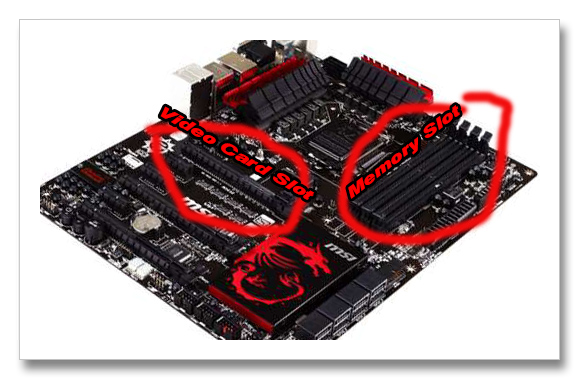
Video card loose contact or defective - try to reseat the graphics card from PCI-express slot and if you have an older PC just reset the graphics card in Accelerated Graphics Port (AGP). If the motherboard has onboard vga try to connect the vga cable into it and see if the PC boots up. Some motherboard model need to reset the CMOS settings in order to shift the Display from PCI-Express / AGP Video Card to its built-in vga.
- Long Continuous beep (It never stop until you turn off the computer) - Memory Error
Memory Loose Contact or Defective Memory – Remove the memory from its slot, and clean the memory including the memory slot. If it still doesnt work try to insert to another slot or try another memory.
Note: Avoid inserting memory in reverse position.
- Short Continuous beep (It never stop until you turn off the computer) - Memory Error
Replace Memory – but try to check the memory in another computer.
Unusual motherboard beeps and its equivalent error
- Continuous Short beeps 3 to 5 seconds and stops – Motherboard or Processor Problem
Most of the the time this kind beep is a motherboard error if the motherboard is 4 years old and above. Time for replacement. You may consider resetting the processor it also helps sometime.
If the computer is full of dust, clean it and see if works.
Available link for download
Subscribe to:
Posts (Atom)