Thursday, November 17, 2016
Windows 10 Recovery Partition
Windows 10 Recovery Partition
The Recovery Partition After Upgrading to Windows 10 from Windows 7/8Share this:
What Is Recovery Partition?
When installing a Windows operating system (OS) on a hard drive, and if you use Windows Setup to create new partition on an MBR disk, Windows will create a system reserved partition, and if it is a GPT disk, then Windows will create a recovery partition and a EFI system partition without drive letter. The recovery partition on Windows 10 consumes about 450MB, Windows 8/8.1 200MB, and Windows 7 100MB. This recovery partition is to hold the Windows Recovery Environment (WinRE), which can be explored if you manually assign a drive letter to it. If you delete this partition, you won’t be able to use Windows Recovery options. If you create Windows 10 recovery disk, Windows will give you an option to remove the recovery partition. With the recovery drive, you can still use Windows recovery options. Otherwise, if you install Windows on a hard drive containing multiple partitions, Windows will save the WinRE in a folder named Recovery in the root directory of your system drive (C: drive) without leaving a recovery partition.Apart from the recovery partition of Windows, there may be another recovery partition created by the computer manufacturer like Lenovo and Dell that has made their computer come with an OEM recovery partition consuming about 7 to 20 GB, which contains the WinRE and their factory installation files. On some computers, the WinRE and the factory installation are separately stored on two partitions, so you may see two OEM partitions on your computer. This OEM partition allows you to press a specified key to boot into Recovery Environment, so you can recover your OS to factory setting without a Windows installation disc. If you have a copy of Windows installation, you can delete this OEM partition to free up more disk space.
Why An Extra Recovery Partition Created During Upgrade?
Every time when you upgrade Windows to the next version, the upgrade program will create a recovery partition if it detects that there is no sufficient space on your recovery partition (GPT disk) or system reserved partition (MBR disk). There is no wonder that you have many recovery partitions after upgrading to Windows 10. If you don’t want Windows to create another recovery partition, you can increase the size of recovery partition or system reserved partition before upgrading to Windows 10.According to Microsoft, the previous Windows version recovery partition will be nonfunctional, so you can delete the previous recovery partition to free up some disk space. As you may know that Windows can only shrink a partition from its right side, so you can tell which recovery partition was new created by upgrading to Windows 10. For example, as the screenshot below, the 100MB recovery partition was created when installing Windows 7, the 200MB recovery partition was created when upgrading Windows 7 to Windows 8, the 500MB recovery partition was created when upgrading Windows 8 to Windows 10, and the OEM recovery partition created by PC manufacturer before shipping.

How to Delete Recovery Partition in Windows 10?
You cannot delete a recovery partition with Windows 10 Disk Management for it has crucial files, but you can use diskpart.exe to delete it. However, you still cannot extend the remaining partition with the new created unallocated space if the recovery partition appears before the C: drive. Hence, you need third party partition software to do this job. AOMEI Partition Assistant Standard, free partition software, can delete recovery partition and extend a partition as long as there is unallocated space on the disk.1. Download this free software. Install and launch it.
2. Right click the recovery partition you want to delete and select "Delete Partition". Then you can see the recovery partition becomes an unallocated space. Actually no changes will be made until you confirm and click Apply.


How to Create A Recovery Partition?
Many users have met the problem that OEM partition won’t work after upgrading to Windows 10. What to do when you want to use recovery options only to find you have mistakenly delete the recovery partition? You can use AOMEI OneKey Recovery to create a recovery partition on Windows 10 to backup and restore your current system including all the programs installed on C: drive. It also allows you to press a specified key “F1” or “A” to boot into AOMEI OneKey Recovery environment when your computer starts.After creating the recovery partition, you can also keep the system backup image files in other locations besides the recovery partition, which means you can keep many system backups at same time. When system fails to work, you can just press the Specified key to boot into AOMEI OneKey Recovery and select the system backup to restore system.

Available link for download

Saturday, November 5, 2016
Which Partition To Install Windows 7
Which Partition To Install Windows 7
[ubuntu] Windows installation Error - GPT partition
I have googled how to install window 7 after installing ubuntu and found out couple of good http://en.wikipedia.org/wiki/Microsorved_Partition for better understanding Adv Reply . May 4th UEFI Windows 7 http://ubuntuforums.org/showthread.p3#post12635283. For info on UEFI boot ... Read Article

Upgrading From Windows XP To Windows 7 - Macomp.com
Download and install Windows 7 Upgrade Advisor reveals a dialog box that says "Windows must be installed to a partition formatted as NTFS," then your computer’s hard disk is likely formatted using the older FAT32 file system. ... Return Document
Windows 7 install partition Problem | Apple Support Communities
After creating the partition using Boot Camp and inserting the Windows Install DVD in the drive. When I create my Windows 7 partition http://en.wikipedia.org/wiki/GPT_Disk SUPPORT tab takes you go http://www.apple.com/support just add bootcamp to find all the Apple help, ... Read Article

Cant install windows (GPT Partition) - Windows - Windows 7
Installing windows 7 over windows 8.1 in GPT style Partition; GPT format can't install; Solved Cant format partition during Windows 7 Fresh Install; Tom's Hardware Around the World. Tom's Hardware Around the World. Denmark; Norway; Finland; Russia; France; Turkey; ... Read Article

Ubuntu Install Manual Partition Windows 8 New
Ubuntu Install Manual Partition Windows 8 New I installed Windows 8.1 in my computer and now I've installed Ubuntu 14.04 and I've Warning: if you are a new Ubuntu user, you may want to follow the advice of the previous paragraph. ... View Document

Windows 7 Manual Partition Magic 8 Compatibility
Windows 7 Manual Partition Magic 8 Compatibility magic 8 serial number how install windows 32 bit compatible creative suite 5.5 master collection crack illustrator cs6 version. The OS X Yosemite v10.10.4 update improves the stability, ... Fetch Document

5.2.1.7 Lab - Install Windows XP
5.2.1.7 Lab - Install Windows XP Introduction Print and complete this lab. In this lab, Press Enter again to select “Format the partition using the NTFS file system”, which is the default setting. IT Essentials Chapter 5 Lab ... Doc Viewer

Intel Rapid Start Technology User Guide
Install Windows 7 on the SSD. Install all required device drivers. Do not install the Intel Rapid Start Technology software yet. Configure Intel Rapid Start Technology in BIOS Setup hibernation partition for Intel Rapid Start Technology. Installing the Intel Rapid Start Technology ... Return Doc

Migration To Windows 7 With Paragon Partition Manager
You can also use an existing partition to install Windows. If the partition es: ws could also enlarge the Windows 7 partition to occupy all free space on the hard drive, or move the partition and create an auxiliary one. ... Access Full Source

Technical White Paper HP Recommends Windows. Restoring ...
This section will detail the steps to install the Microsoft Windows 7 operating system (OS) To install using an MBR partition, Restoring Microsoft Windows 7 on the HP Z240, Z620, and Z820 Workstations HP recommends Windows. 2. ... Retrieve Document

Installing Windows 7 64 Bit On A Mac (Snow Leopard) Supplement
Installing Windows 7 64 bit on a Mac (Snow 2. Run the Boot Camp Assistant (you will create a partition for Windows, and begin the Windows installer) 3. Install 12. Now that Windows is installed, you still need to install the Windows support software and drivers for the hardware on ... Retrieve Full Source
Install Linux Inside Windows 7 | Linux.org
Can I install Slackware / Fedora / Mint inside my Windows 7 without moving any partition? Likes Received: 17 Trophy Points: 8. Try installing https://www.virtualbox.org/ and on the top install what ever flavour of OS you using something like VirtualBox http://en.wikipedia.org/wiki ... Read Article

Boot Camp Installation & Setup Guide - Apple Support
Boot Camp Installation & Setup Guide. Contents. 2. 3 Introduction 4 Installation overview 4 Step 1:heck for updates C 4 Step 2:repare your Mac for Windows P 5 If you have problems creating a partition 6 Step 3: Install Windows on your Mac ... Access Full Source

Installing Microsoft Windows - Hewlett-Packard
HP recommends the Paragon Partition Alignment Tool to align the partitions. Windows 7 with Service Pack 1 (SP1) or later and Windows Vista™ with SP1 or later are Advanced Windows Vista: HP Workstation recovery media cannot be used to install Windows Vista on AF ... Document Viewer

Which Partition To Install Windows 7 - Microsoft Community
Once I install it on a partition, how do I uninstall windows vista when By using this site you agree to the and use that value as a guide to where to install Windows 7. Note: Windows 7 Professional can not upgrade Windows Vista Home ... View Video

Installation Android + Windows 7 (Dual-Boot) On CTFPAD
Installation Android + Windows 7 (Dual-Boot) on CTFPAD In this tutorial we step-by-step explain how to install Android and Windows 7 on CTFPAD. What you need : a.) Two USB sticks (1x min. 512MB, „creat partition primary ... View Full Source

Technology Stock Roundup: GOOGL Logo, AAPL-CSCO Tie & More
Google (GOOGL) changed its logo, Apple (AAPL) and Cisco (CSCO) announced a collaboration and Intel (INTC) finally launched the Skylake family. ... Read News

Boot Camp Installation & Setup Guide - Apple Support
Boot Camp Installation & Setup Guide. Contents 2 4 Introduction 5 What You Need 6 Installation Overview 7 If You Have Problems Creating a Partition 7 Step 3: Install Windows 8 Selecting and Formatting the Windows Partition 10 Setting Up Windows ... Return Doc

Windows 7 Manual Partition Size Limit Boot Camp
Windows 7 Manual Partition Size Limit Boot Camp Jun 22, 2015. Windows 7 will boot from 2 tb partiton with standard bios, from 4 tb partitions on install Windows 7, 8, 8.1 on OS X Yosemite. for the window 8.1. In fact, ... Access Doc

Hp Recovery Instructions Windows 7 Partition Removed
Hp Recovery Instructions Windows 7 Partition Removed test by So to recover these partitions you have to install HP UEFI support When we upgraded to Windows 8.1, I noticed some tangible improvements over Windows 7. Laptops, Dell Laptops, ... Document Viewer

You Cannot Select Or Format A Hard Disk partition When You ...
Describes a problem that may occur when you try to install Windows Vista, Windows 7 or Windows Server 2008 R2. You may receive a "Windows is unable to find a system volume that meets its criteria for installation" error message. Support. Cart ... Read Article

WINDOWS 7 INSTALL3 - ZT Systems
Windows 7 Installation Step by Step Page 4 of 8 Fig.6 Step 8. “Where do you want to install windows?” Make sure the partition is highlighted. ... Fetch Doc

How To Remove Hard Disk Partition In Windows 8
Install windows and create the 1st partition. in Forum, How to remove hard disk drive hp mini 210-1084tu pc Forum, How to remove hard disk drive hp mini 210-1084tu pc Forum, How to install pre-Installed windows 8 key on new hard drive. ... Document Viewer

Partition The Hard Drive In A Windows 7 Install - Windows 7 ...
Windows 7 Forums is the largest help and support community, providing friendly help and advice for Microsoft Windows 7 Computers such as Dell, HP, Acer, Asus or a custom build. ... Read Article

BOOTMGR Is Missing After Windows 7 - Operating Systems
Allow windows 7 to install to it and it will also create a new windows is on C storage(fresh partition; same physical drive) is D dvd is E i still have 2 SATA drives are awaiting being plugged in again when the bootmgr is back in his office ... Fetch Content

Boot Camp Installation & Setup Guide - MilitaryCAC
Creating a Partition for Windows Boot Camp Assistant helps you create a new partition for Windows on an internal disk. In order to partition your disk and install Windows using Boot Camp Assistant, the disk ... Access Doc

Dual-Booting Windows 7 And Linux Fedora - ZGRAF Software
Dual-Booting Windows 7 and Linux Fedora Author: John Jakob Date: 6/9/2012 Email there are several different ways to install the Fedora operating system, as the I tried blasting away the Linux partition using the Windows 7 “Disk Management” utility and then reinstalling the operating ... Fetch Document
Available link for download
Thursday, November 3, 2016
The Selected Disk has and MBR Partition Table Windows can Only be Installed to GPT Disk Error
The Selected Disk has and MBR Partition Table Windows can Only be Installed to GPT Disk Error
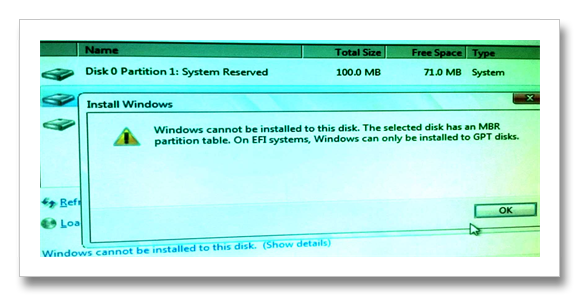
In the picture below it appears that the problem occurs during the installation of Windows 7. In this action the existing partition of disk is deleted. Then create a partition but when installing the Windows Operating System the message “Windows cannot be installed to this disk. The selected disk has an MBR partition table. On EFI systems, Windows can only be installed to GPT disks".
With this error it means that the existing partition layout of the Hard disk drive is not compatible to Windows 7 Operating system. To fix this problem you have to convert the disk drive layout to GPT.
The difference of MBR and GPT
MBR disks have 1 partition table to keep track of all the blocks in the partition. If the table becomes corrupt, the entire disk must be recovered from backup.While Windows GPT-based disks have multiple, redundant partition tables so that if one is detected as being corrupt, it can self-heal itself from a redundant copy of the table.
Click the Link Below for Next Troubleshooting
- GPT Disk VS MBR Disk Partition Overview
- Guide for Converting MBR Disk to GPT Disk and Install Windows Operating System
Available link for download
Friday, October 28, 2016
VCOM Partition Commander 9 0
VCOM Partition Commander 9 0

Last time I used Partition Commander was version 6. Yes, I had an issue where I lost a partition, but I became well aware of the program after that.
Bought Version 9 (even after reading the reviews) because I bought a Dell laptop and for some reason Dell thinks I like a 80 GB drive all in one partition. Thinking I had nothing to lose since the laptop is so new, I bought Partition Commander 9 and installed it. I too chose NOT to use the 2 floppies, and install continued fine for me. I chose NOT to install or use System Commander because I didnt want to have that as a boot loader.
For the single purpose of breaking my one drive into 3, I rebooted the laptop and went to work in the familiar interface that I was used to in Version 6. After making the changes, exited out, rebooted and expected the worst due to the previous reviews here. XP booted with no issues and I now have 3 partitions.
Software Download
Available link for download