Showing posts with label the. Show all posts

Wednesday, March 29, 2017

Virus Infected Access the Hidden Files in Any Removable Media

Virus Infected Access the Hidden Files in Any Removable Media


When the flash  drive or any external storage device  is infected with a virus. The common problem we  encounter is that the files and  folders are missing inside. We thought that the files and the folder in the removable drive is deleted by virus.

The original copy is hidden inside the removable storage media ( that is, memory card, sd card, Microsd, flash disk, portable drive, built-in memory of cellphone, thumb drive, etc.).  If you haven’t yet update your antivirus to it’s latest definitions, the probability you will get infected this kind of infection is very high.

So be careful when using your external storage media to the computer that have not yet updated their antivirus program or no antivirus at all.
Hide by Virus

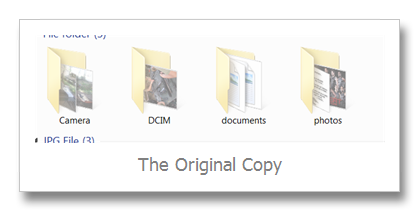
The picture ‘The Original Copy” is hidden by default. If you want to show this file again, just right click the folder and click properties and uncheck the Hidden selection.


But wait it’s not all  the time you open the properties you come up with the same information. Sometimes the Hidden option  selection is blurred and  can’t be access through uncheck.

To solve the problem:

  • You may copy or backup all the files inside the folder

  • after copying/ backing up all the files in different folders you may format the storage device or just delete the hidden folder

When you’re not comfortable the copying procedure you m
ay follow my alternative option:

  • Click Start Menu, Click Run (Windows XP System)

  • Click Windows Icon, click search area (Windows Vista and Windows 7)

  • Type Cmd

  • Hit Enter key on the keyboard

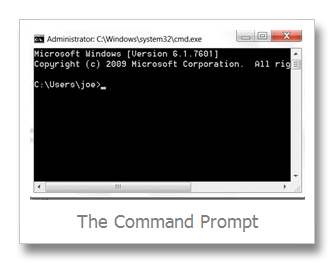
  • The windows command prompt appears
Windows CMD

Depending on the drive letter of your usb flash drive or removable device, type at the command prompt in this format

  • Removable device drive letter then colon

  • Sample if the the drive letter of the drive is F:

  • type F: , then hit enter

  • at the F:>

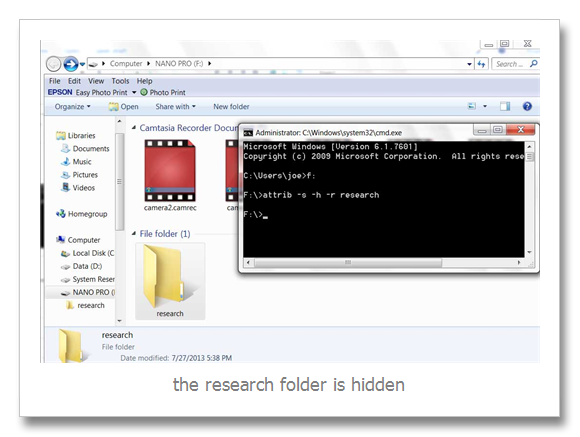
  • type the attrib –s –h –r  filename
attributes

In the above picture the research folder is blurred or hidden, to show the folder I type the attrib –s –h –r  research (research is the filename of hidden folder) to show it (hidden files in removable media|).

The solution above is useless  when your computer is still infected with a virus.


Available link for download

Read more »

The Microsoft Windows YouTube site looks to be updated to HTML5 version

The Microsoft Windows YouTube site looks to be updated to HTML5 version


What a busy day for Microsoft. While looking for a version to post if Windows 8, I was meet with this.

image


Available link for download

Read more »

Monday, March 27, 2017

Wireless Tips – Does Your Wireless Router Keep Disconnecting or Dropping the Connection

Wireless Tips – Does Your Wireless Router Keep Disconnecting or Dropping the Connection


I’ve had a Netgear wireless router for about a year now and it’s been pretty good until a couple of weeks back all of sudden my wireless connection kept dropping or I couldn’t connect unless I restarted the router! It was a royal pain, but because I’m lazy I didn’t get around to fixing it earlier! If you’re in the same situation, here’s what you can do to fix the problem!
The issue is usually caused by one of three things: the driver for your wireless card, the firmware version on your router (basically the driver for the router) or settings on your router. I have found that unless you’re using a really old wireless router, it’s more than likely an old driver for your wireless card that is the culprit. So you have to update the wireless card. How do we do that?

Update PC Driver

First, you’ll need to go to the web site for the manufacturer of your computer: Dell, HP, Toshiba, etc and go to their support or driver downloads page. Here I’ve tried to get the direct links to those pages for the most common computers:
Dell – http://www.dell.com/support/home/us/en/19/Products/
HP – http://www8.hp.com/us/en/drivers.html
Toshiba – http://support.toshiba.com/drivers
Sony – http://esupport.sony.com/perl/select-system.pl?DIRECTOR=DRIVER
Lenovo – http://support.lenovo.com/us/en/products?tabName=Downloads
Select your system or type it in and find the latest driver for you wirless card. There is usually a section called Networking and underneath you should see a list of drivers. One of them should have the word “Wireless” in it. If you have more than one wireless driver, then you need to figure out which one you have installed on your computer.
wireless card driver
You can determine the model number for your wireless card by pressing the Windows key + the Pausebutton at the same time. This brings up the System Properties dialog. Another way to get to it is to right click on My Computer and select Properties. Once there, click on Advanced system settings.
advanced system settings
Click on the Hardware tab and then click on Device Manager.
device manager
You’ll see a list of devices with plus signs to the left of them. Click on the one called “Network Adapters” and there will be an entry for your wireless card as shown below:
device manager drivers
Now download that driver from the list off the manufacturers web site. Usually the wireless card is called something “Intel Pro Wirelss” or “Dell Wireless”, etc. Once you download the file to your desktop, double click on it and follow the steps to install. You might have to restart your computer.
If the driver on the computer was the problem, the dropped connections should go away completely. If not, then you might have to try updating the router firmware.

Update Router Firmware

Updating router firmware is a not so trivial task that varies depending on the router brand you happen to have. Almost none of them have an automatic update feature. Instead you have to download the latest firmware from their website, log into your router and then upload it up perform the update.
To get started, you need to figure out the IP address of your router and use that to log in via a browser. Read my post on finding the IP address for a wireless access point. Since the method to update the router firmware varies so much by brand, it’s best to search your router model number + “firmware update” to find specific instructions.

Router Settings

The last issue that can be causing dropped connections is various settings on your router. In recent times, you have dual-band routers which let you broadcast on both 2.4 and 5 GHz networks. These advanced routers normally work really well with the latest gadgets and computers, but on older machines, you can sometimes run into issues. Here’s a couple of things I would try:
1. Connect to the 2.4 GHz network if you’re currently connected to the 5 GHz one.
2. On the router, make sure the channel settings for the networks is set to Auto. If you have picked a particular channel for some reason, try a different channel.
3. Turn off extra security features like MAC address filtering, network isolation and Wi-Fi Protected Setup. None of these really increase security all that much and end up causing more trouble.
4. Make sure your wireless network mode is set to Mixed. Sometimes picking a higher mode can cause problems with older devices.
5. If you don’t know anything about your router settings, try resetting your router completely by pressing the reset button. Configure wireless security and leave it at that.
wireless settings
Hopefully one of these solutions will fix your wireless connection problem. If you have a different solution, please leave a comment and let us know. Enjoy!

Available link for download

Read more »

Sunday, March 26, 2017

Wait the World didnt end yesterday I better send that Mortgage payment after all!!!

Wait the World didnt end yesterday I better send that Mortgage payment after all!!!


Available link for download

Read more »

Friday, March 24, 2017

The Forest Public Alpha 2014 CRACK FREE DOWNLOAD Update v0 11c

The Forest Public Alpha 2014 CRACK FREE DOWNLOAD Update v0 11c


The Forest Public Alpha 2014 CRACK FREE DOWNLOAD Update v0.11c
The Forest Public Alpha v0.11c Cracked-3DM
Release: 12/2014
Genre: Action, Adventure, Indie, Simulation, Early Access
Developer: Endnight Games Ltd
Publisher: Endnight Games Ltd
Language: English
Size: 584 MB

As the lone survivor of a passenger jet crash, you find yourself in a mysterious forest battling to stay alive against a society of cannibalistic mutants.
Build, explore, survive in this terrifying first person survival horror simulator.
Enter a living, breathing world, where every tree and plant can be chopped down. Below ground explore a vast network of caves and underground lakes.

Features:
Chop down trees to build a camp, or start a fire to keep warm. Scavenge food to keep yourself from starving.
Build a small shelter or a large ocean side fortress. Lay traps and defences to keep a safe perimeter.
Explore and build during the day. Defend your base at night. Craft weapons and tools. Bunker down during the evening or bring the fight directly to the enemy.
Defend yourself against a clan of genetic mutant enemies that have beliefs, families, morals and that appear almost human.
Use stealth to evade enemies, or engage them directly with crude weapons built from sticks and stones.


Download Links

Uploaded.net

Uploadrocket.net

Rapidgator.net


Available link for download

Read more »

The Epson Ink Pad Reset IPR Epson Universal Reset Utility Download

The Epson Ink Pad Reset IPR Epson Universal Reset Utility Download


Epson Ink Pad Reset (IPR) info:

To reset the Ink Pad Counter, download the Ink Pad Reset Utility from the website www.epson.com/ipr. The Ink Pad Reset Utility software currently runs on Windows operating systems: XP(32/64) and Vista(32/64). If you want to run it on Windows 7, just right click the program and set the Windows XP Operating System Compatibility Mode.

Click here to Download Epson Resetter Utility.

 You do not need to have the printer driver or status monitor software installed to use the utility. Once downloaded, launch the program and follow the prompts. Some older products do not need a reset utility and can be reset by holding several panel buttons down during power-up of the printer.

List of supported Epson Printer Model of Epson Reset IPR Utility Software:

  • Epson 1280

  • Epson 1290

  • Epson 1400

  • Epson 1410

  • Epson C45

  • Epson C46

  • Epson C48

  • Epson C65

  • Epson C66

  • Epson C67

  • Epson C68

  • Epson C79

  • Epson C85

  • Epson C86

  • Epson C87

  • Epson C88

  • Epson C88+

  • Epson CX3500

  • Epson CX3700

  • EpsonCX3800

  • Epson CX3805

  • EpsonCX3810

  • Epson CX3900

  • Epson CX4000

  • Epson CX4100

  • Epson CX4200

  • Epson CX4500

  • Epson CX4600

  • Epson CX4700

  • Epson CX4800

  • Epson CX4900

  • Epson CX5000

  • Epson CX5900

  • Epson CX6000

  • Epson CX6600

  • Epson CX7700

  • Epson CX7800

  • Epson R1800

  • Epson R200

  • Epson R210

  • Epson R220

  • Epson R2400

  • Epson R260

  • Epson R270

  • Epson R300

  • Epson R320

  • Epson R340

  • Epson R380

  • Epson R390

  • Epson R800

  • Epson RX580

  • Epson RX590

  • Epson RX600

  • Epson RX620

  • Epson CX6500

  • Epson RX700
and some Epson picturemate printers


Available link for download

Read more »

Wednesday, March 22, 2017

The New iPhone 5 4G LTE and Macs with Retina Display

The New iPhone 5 4G LTE and Macs with Retina Display


The New iPhone 5 / 4G LTE and Macs with Retina Display

We are so much waiting for the new iPhone and some news about upcoming WWDC 2012 event by Apple. There are many rumors out there, which could possibly become the reality as happened with The New iPad. The leaked reports were so much close this time with the iPad 3rd Generation release. So its really worth to read about the rumors from various valid sources, that can give us some clue of what will be the upcoming products of Apple and their specifications as well.

The upcoming products of Apple as by rumors are as follows:
  1. Apple may schedule the next WWDC event this 11th, June 2012. 
  2. iPhone 5 / 4G LTE with 3.5 Inch Display is expected to be released this October 2012.
  3. Macbook Pro, Macbook Air and iMac likely to get Retina Display for more sharper images and that uses more GPU Power and RAM.

Apple WWDC June 2012 Event

This will get more attention as many thinks that Apple will be releasing their next iPhone which may be iPhone 5 or iPhone 4G LTE or The New iPhone or iPhone 5th Generation. Only God and Tim Cook knows what it is going to be named. As we can see that recent iPad 3 release happened few days ago, gave a huge question over the name of it across the web, and people started to search across Google and the Apple Live Event logs for the name of the iPad once the release of the new iPad got over.


Because its totally new, unexpected and a big surprise to the Apple fans across the globe. Apple has changed their way of naming the iPad to Generation than by giving some numbers after iPad. So what we can expect this 11th, June 2012 WWDC event, and the release of Mountain Lion OS X Final or Stable version and some demonstration of iOS 6. This has been in development for some time and we can guess easily that the upcoming event can be all about Mac OS X.

via dailytut

Lets hope for the best and welcome the new products and macs.

Thanks for reading and let us know about this upcoming possible developments in Apple iPhone and Macs in the comments.

Available link for download

Read more »

Sunday, March 19, 2017

Toshiba gives you more options in the “shape” of your Tablet

Toshiba gives you more options in the “shape” of your Tablet


Well, at least these will not cause Apple to sue for IP infringement.


Available link for download

Read more »

Thursday, March 16, 2017

Windows Make the Caps Lock Key Beep When Pressed

Windows Make the Caps Lock Key Beep When Pressed


          It’s extremely annoying when you’re typing and accidentally hit the Caps Lock key without knowing it. Here’s how to make it alert you when it’s pressed.

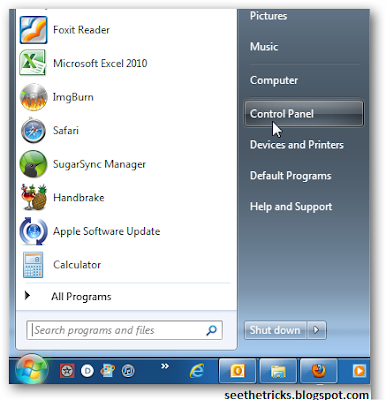
In Vista and Windows 7 Click Start >> Control Panel.

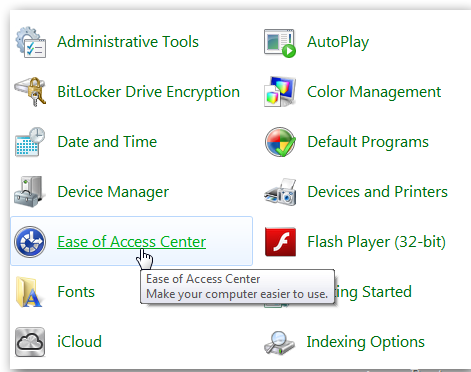
Next, switch to Classic View and click Ease of Access Center.

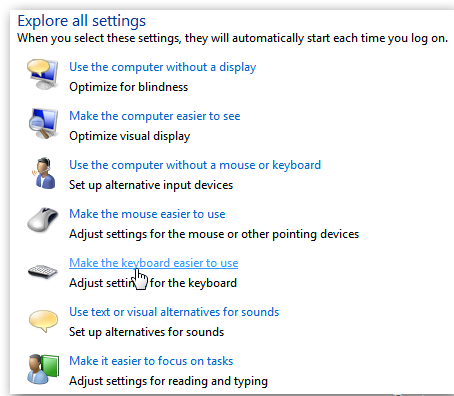
Scroll down under Explore All Settings, and click Make the Keyboard Easier to Use.

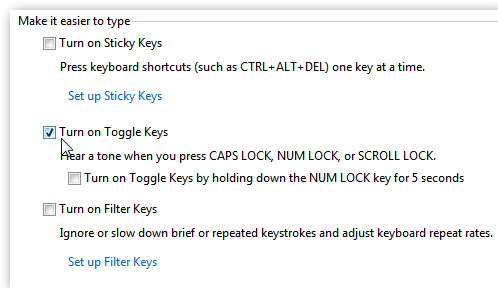
Then scroll down under Make it Easier to Type and check Turn on Toggle Keys. Make sure to save your settings and close out of Control Panel.
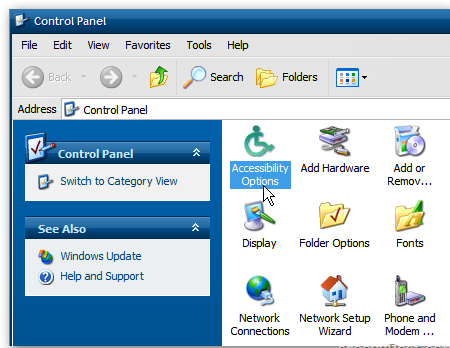
XP users can do this too. Just open Control Panel and double click Accessibility Options.

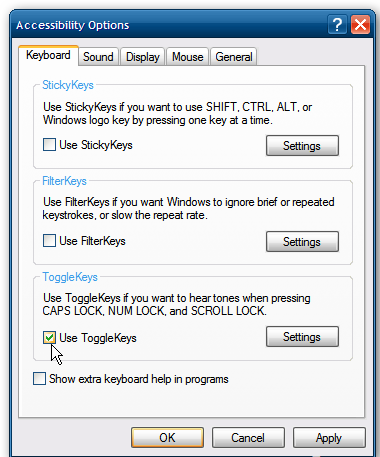
Then check Use ToggleKeys. Click OK.
That’s it. Now when you hit the Caps Lock key by accident or not, it will beep to alert you it’s been pressed. This comes in handy when typing and not accidentally SHOUTING at friends or colleagues.
If you find no use the Caps Lock key at all – just disable it.

Available link for download

Read more »

The Incredible Mountain City of La Paz Bolivia

The Incredible Mountain City of La Paz Bolivia


La Paz whose full name is Nuestra Señora de La Paz is the administrative capital of Bolivia and the second largest city in the country (in population) after Santa Cruz de la Sierra. Bolivia has two capitals - while the official capital of Bolivia is Sucre and it is the seat of Justice, La Paz has more government departments, hence the "de facto" capital of the country. At a elevation of roughly 3,650 m above sea level, Laz Paz is also the highest de facto capital city in the world.
La Paz is built in a canyon created by the Choqueyapu River (now mostly built over), which runs northwest to southeast. The city sits in a bowl-like depression surrounded by the high mountains of the altiplano. As the city continues to grow, it climbs over the hills, the buildings clinging impossibly to the mountain side. The sight from the air as one flies into La Paz is incredible. “First, one sees the sprawling shantytowns of El Alto, slowly giving way to the sight of La Paz itself, clinging tenuously to the sides of what looks like a large gash in the earth.

Overlooking the city is towering triple-peaked Illimani, which is always snow-covered and can be seen from several spots of the city, including from the neighbor city of El Alto.
The geography of La Paz, in particular the altitude, reflects society: the lower areas of the city are the more affluent areas. While many middle-class residents live in high-rise condos near the center, the houses of the truly affluent are located in the lower neighborhoods southwest of the Prado. And looking up from the center, the surrounding hills are plastered with makeshift brick houses of those less economically fortunate. The satellite city of El Alto, in which the airport is located, is spread over a broad area to the west of the canyon, on the Altiplano.
La Paz is an important cultural center of Bolivia. The city hosts several cathedrals belonging to the colonial times, such as the San Francisco Cathedral and the Metropolitan Cathedral, this last one located on Murillo Square, which is also home of the political and administrative power of the country. Hundreds of different museums can be found across the city, the most notable ones on Jaén Street, which street design has been preserved from the Spanish days and is home of 10 different museums. La Paz is renowned for its unique markets, very unusual topography, and traditional culture.


Available link for download

Read more »

Wednesday, March 15, 2017

The Incredible Hand Crafted Art of Kyle Bean

The Incredible Hand Crafted Art of Kyle Bean


Kyle Bean is an incredible young talent, specialising in hand crafted models, set design and art direction. Since graduating in 2009, Kyle has worked for a variety of international clients for a diverse range of projects including installations, window displays, editorial illustration and advertising.
Kyle’s work has been recognised by the prestigious Art Directors Club in New York and the International Design Biennial held throughout Europe. His work has been featured in a range of international art and design publications, praising him for both his conceptual thinking and craftsmanship. Kyle splits his time between working from his studio by the sea in Brighton and London where he often collaborates with photographers and directors. Kyle is represented by Blinkart.
What stands out most about Kyle’s work is his diverse range. While he has a clear gift for papercraft, the variety in materials used and the creativity in which he employs them is truly exceptional. Many of his pieces, especially those for magazine covers and editorials, are often cheeky, akin to visual puns.

What Came First?


Soft Guerilla for CUT Magazine

A series of weapons made from harmless materials for a feature article centred around the topic of ‘Guerilla Gardening’ and ‘Yarn Bombing’. Photography by Sam Hofman


Mobile Evolution


Bird Flu

A sculpture of a mushroom cloud made from feathers for an article in Scientific American. Photo: Sam Hofman
 

24. Paper Suits

Paper suits created for a series of images showcasing LV accessories. Photography: Lacey.


Wood Portraits

A series of portraits carved from wood for the Wallpaper* 2012 Handmade Issue


Stick Insects

Insects made from Matchsticks. Photography by Owen Silverwood


Available link for download

Read more »

Thursday, March 9, 2017

Track the Existence of Android Smartphone from Another Device

Track the Existence of Android Smartphone from Another Device


Lost cell phone is certainly very annoying. And for those of you who have a lot of important and valuable data, the loss feels the more suffocating. In addition to later have to reassemble the data, the data will be utilized at the time are not responsible is the other things that could make the more giddy.
 
 
But the sophistication of mobile phones as well as the latest operating system at this time gives little hope indeed will be a clue as to its existence. Although it takes several terms to find it, at least you still have a way that can be tried. In addition to monitoring the whereabouts of a cell phone, there is another feature that allows to remove or lock the data remotely in order to avoid the possibility of hacking the data. Here are a few things to be prepared as well as the steps that must be done:

Getting started on Android phone


Before you lose your mobile phone (hopefully this does not happen), you must first prepare the configuration can be useful if the bad stuff happens.
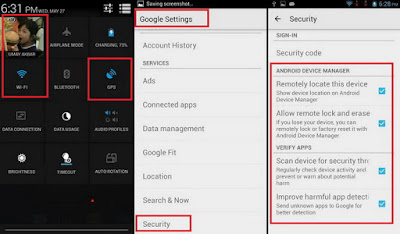
  • Turn on your Google account on the mobile phone
  • Turn on the GPS location or function
  • Turn on the internet connection (can use data or Wi-Fi)
  • Google Settings, go to Security, and enable all featured with tick marks.
Detect of the existence of another Android phone

To monitor the whereabouts of the other mobile phone, do the following:
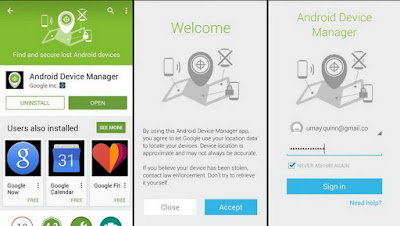
  • Install Android Device Manager apps Google-made to be had from Google Play Store.
  • Click Accept on each aggrement displayed on the initial configuration.
  • Log in using the same Google account with the Android that will be monitored.

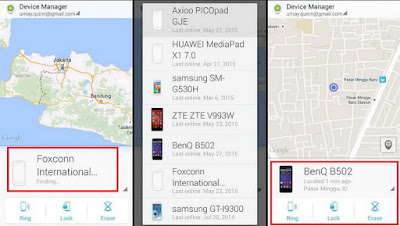
  • If ever enable some phones using your Google account, then before you have to select the first cell phone that will be monitored. Press the phone list.
  • If true, then the application will instantly detect its presence by displaying your location via a map.
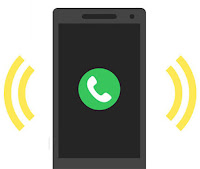
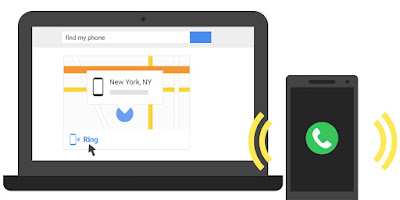
  • In addition, there are three features that can be used i.e., Ring, Lock, and Erase. Featured Ring will send a ringing sound to the phone so that you can easily find it if tucked or unknown whereabouts.
  • Featured Lock will lock the phones in question so that others cannot open it for not knowing the keywords you use.
  • Featured Erase can be used if you dont want the data stored is used by other people.

Detection of the desktop browser

If using a computer, it can also monitor the existence of Android phones from your browser.
  • Access to the address https://www.google.com/android/devicemanager.
  • Log in using the same Google account with the Android phones.
  • Select the type of phone, the application will automatically mengontal the existence of the phone.
  • If successful will be shown the address of the sites existence as well as featured

    Available link for download

Read more »

Sunday, March 5, 2017

The Microsoft Surface Keynote – Full Video

The Microsoft Surface Keynote – Full Video


Available link for download

Read more »

Monday, February 20, 2017

The Best New Features in Windows 8

The Best New Features in Windows 8


The Best New Features in Windows 8

Windows 8 is available for download today, complete with a new tiled, touch-friendly interface as well as some enhancements to the traditional mouse-and-keyboard desktop. Heres everything youll find in the newest version of Windows.
Microsofts "re-imagining" of Windows is focused very heavily on a new, tiled, touch-centric interface for tablets. However, its still somewhat usable with a mouse and keyboard-and no matter what device youre on, you can switch between the simple Metro interface and the traditional Windows desktop to fit whatever your needs are at that given moment.

Performance Increases

The Best New Features in Windows 8 

One of the issues thats been on our minds since they first previewed this new interface was whether this will keep bogging Windows down with more running processes, and whether running a full Windows desktop on a low-powered tablet was really a good idea (after all, weve seen Windows run on netbooks).

Microsoft knows your fears, and has addressed them: Windows 8 is slated to have better performance than Windows 7, even with this metro interface running on top of a desktop. We ran a few tests back when the the Developer Preview came out and found that to be the case, especially when it comes to boot times. Tablet users and netbook users especially should notice a fairly significant performance increase with Windows 8. Especially considering that any of your tablet-based apps will suspend themselves when you jump into the traditional desktop, so all they take up is a little of that extra RAM

The Lock Screen

The Best New Features in Windows 8
Windows 8s lock screen is pretty much what youd expect: its got a beautiful picture along with a few little widgets full of information, like the time, how many emails you have, and so on. You can swipe up to unlock, or press the spacebar if youre on a desktop keyboard. You can then proceed to type your normal password, or use one of Windows 8s "picture passwords," which let you swipe or draw an invisible gesture that only you know, using your lock screen photo as reference, to let yourself in (though this is really better on tablets than it is on a PC). For example, in Microsofts original demo, they used a photo of a person, and the password was to tap on their nose and swipe left across their arm).

The Start Screen

The Best New Features in Windows 8
Once you log in, youre taken to Windows 8s new Start screen, which replaces the old Start menu. The screen should be familiar to Windows Phone users: Youve got a set of tiles, each of which represents an application, and many of which show information and notifications that correspond to the app. For example, your email tile will tell you how many unread emails you have (and who theyre from), your calendar tile will show upcoming events, your music tile will show you whats playing, and so on. You can also create tiles for games, contacts, and even traditional Windows apps that will pull you into the Windows desktop. The tablet-optimized apps are all full screen and "immersive", though, and you can rearrange their icons on the home screen easily (just as you would on any other tablet platform). At any time, you can press Win+D or click on the Desktop tile to go to the familiar Windows desktop instead.

The Desktop

The Best New Features in Windows 8Expand
Once you get to the desktop, youll be in much more familiar territory. Youve got your taskbar, your desktop icons, and your normal windowed applications as youre used to (though they have a new, flatter, Aero-less theme). The Start menu, however, is gone—instead, you can move your mouse to the bottom left hot corner and click to return to the Start screen, or press the Windows key as normal. Like the old Start menu, you can start typing any time youre on the Start screen to start searching for an app or setting, giving you quick access to everything on your computer.
It isnt nearly as convenient as the old Start menu was, but you can get used to most stuff pretty quickly. Pressing the Windows button and typing in an app or setting is faster than browsing the Start menu anyway, so its a good habit to get into, and you can always access a more traditional menu by pressing Win+X—this will bring up a small menu in the corner that has shortcuts to the Control Panel, Run, the Command Prompt, and other stuff advanced users may want to access.

Full Screen Apps

The Best New Features in Windows 8Expand
While you can pin your favorite apps to the taskbar, as usual, most of your apps will reside on the Start screen, just like they used to reside in the Start menu. Just fire up the Start screen and tap or click on the tile for the app you want to launch (or, as we mentioned above, type it in the search box). Tablet-optimized apps will go full screen, while others will shoot you back to the desktop.
The full-screen apps that come with Windows 8 are really nice: most have touch-based controls, like pinch to zoom and copy and paste, but you can also use them with a mouse and keyboard if you so desire. Each has options like search, share, and settings through the Charms bar, which you can get by swiping from the right edge of the screen or pressing Win+C. Apps can share information one another easily, such as selected text or photos. After picking your media from one app, youll then be able to choose which app you want to share with, and work with it from there. For example, you can share photos to Facebook, send text from a web page in an email, and so on.
None of this is brand new to touch-based platforms, but what is new is the ability to not only multitask, but run these apps side by side. Say you want to watch a video and keep an eye on your news feed at the same time. Just like in Windows 7 for the desktop, you can dock an app to one side of the screen while docking another app at the opposite side, which is a seriously cool feature. Imagine being able to IM and play a game at the same time, or browse the web while writing an email. Its a fantastic way to fix one of the big shortcomings of mobile OSes, thus allowing you to ignore the full desktop interface more often and stay in the touch-friendly, tablet view.

The Windows Store

The Best New Features in Windows 8Expand
The Windows Store looks much like the home screen, with tiles that correspond to different categories and featured apps. From there, you can look at a more detailed list of the available apps in a given section. And, the store contains not only touch-based apps for the tablet interface, but some of the more traditional desktop Windows apps youre used to, so you have one portal to discover all your Windows apps no matter what interface youre using. The Store has free and paid apps, and you can try paid apps before you commit to buying, which is really, really nice.

Sync All Your Data to the Cloud

The Best New Features in Windows 8

The cloud is taking center stage in Windows 8, with your Microsoft account driving all the syncing. Your address book, photos, SkyDrive data, and even data within third-party apps can sync up to the cloud, and you can access them on any Windows 8 device—even a brand new one. Just sign in, and youll have access to everything, which immediately loaded your themes and extensions when you logged in). The address book also syncs with other services like Facebook and Twitter as well. You can even sync all of your settings from one Windows 8 PC to another. Just sign onto your Windows 8 with a Microsoft account and youll get all your themes, languages, app settings, taskbar, and other preferences will show right up. Its a pretty neat feature if you have multiple Windows 8 PCs and dont want to set them all up separately—just a few taps and youve got all your preferences ready to go (you will have to re-download your apps, though).

Windows Explorer

The Best New Features in Windows 8Expand
Windows Explorer has gone through a few changes this time around, most notably the "Ribbon" interface weve come to know from Microsoft Office. Instead of traditional menus like View, you now have three Ribbon panes: Home, Share, and View, that give you access to the features that used to be in the menus. If youre in a folder designed for certain file types—like the "Pictures" library—youll get a few extra Ribbon panes centered around photos, which is pretty cool. Windows Explorer also has native mounting of ISO files, a one folder up button like the old days of XP (thank God), and a really cool "quick access" toolbar in the left-hand corner that lets you add your favorite shortcuts to the title bar. It also has a new file copy dialog that makes it easier to manage move-and-replace actions with lots of files.

A New Task Manager

The Best New Features in Windows 8Expand
Microsofts finally redesigned the task manager, and it looks pretty great. You have a very simple task manager for basic task killing, but if youre a more advanced user, you can bring up the detailed task manager filled with information on CPU and RAM usage, Metro app history, and even startup tweaking—so you can get rid of apps that launch on startup without going all the way into msconfig.

Built-In Antivirus with Windows Defender

The Best New Features in Windows 8


 Microsoft Security Essentials is an antivirus app for Windows, its built in to Windows 8 as Windows Defender. It has nearly the exact same interface and feature set; the main difference is that you no longer have to install it.

Other Features

Along with these cool features, Windows 8 also comes with other features weve come to know and love to see in desktop and mobile OSes alike. Its got system-wide spellchecking, so you dont have to rely on a specific app to keep your writing top-notch, as well as a system-wide search feature, that lets you search anything from your music library to your contacts to the web itself. It also has a really cool feature for desktop users that lets your run the Metro UI on one monitor while running the traditional desktop on the other (not to mention better support for multiple monitors in general—like having the taskbar on both screens).
The Best New Features in Windows 8
           It also has a really cool feature called "refresh your PC", where you can do a clean install with the tap of a button. Whether youre selling your machine or just want a cleaner, faster installation of Windows, you can do it all in one click. You can even set refresh points, similar to restore points, so you can refresh your PC to the way it was at a certain point in time
Available link for download

Read more »