Wednesday, March 29, 2017
Virus Infected Access the Hidden Files in Any Removable Media
Virus Infected Access the Hidden Files in Any Removable Media
The original copy is hidden inside the removable storage media ( that is, memory card, sd card, Microsd, flash disk, portable drive, built-in memory of cellphone, thumb drive, etc.). If you haven’t yet update your antivirus to it’s latest definitions, the probability you will get infected this kind of infection is very high.
So be careful when using your external storage media to the computer that have not yet updated their antivirus program or no antivirus at all.
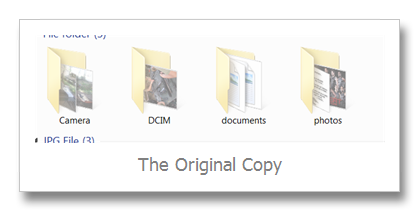
The picture ‘The Original Copy” is hidden by default. If you want to show this file again, just right click the folder and click properties and uncheck the Hidden selection.
But wait it’s not all the time you open the properties you come up with the same information. Sometimes the Hidden option selection is blurred and can’t be access through uncheck.
To solve the problem:
- You may copy or backup all the files inside the folder
- after copying/ backing up all the files in different folders you may format the storage device or just delete the hidden folder
When you’re not comfortable the copying procedure you m
ay follow my alternative option:
- Click Start Menu, Click Run (Windows XP System)
- Click Windows Icon, click search area (Windows Vista and Windows 7)
- Type Cmd
- Hit Enter key on the keyboard
- The windows command prompt appears
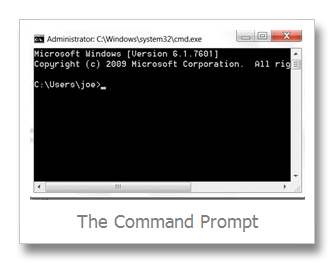
Depending on the drive letter of your usb flash drive or removable device, type at the command prompt in this format
- Removable device drive letter then colon
- Sample if the the drive letter of the drive is F:
- type F: , then hit enter
- at the F:>
- type the attrib –s –h –r filename
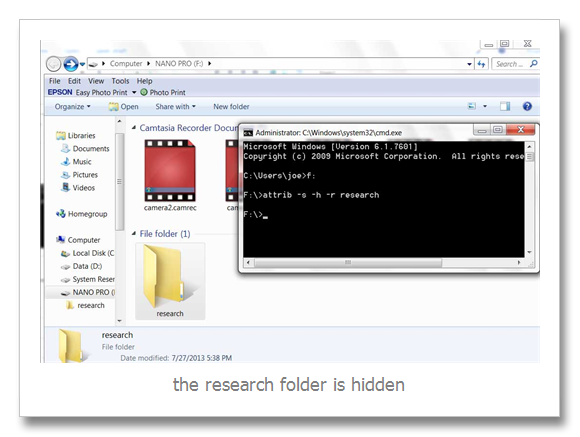
In the above picture the research folder is blurred or hidden, to show the folder I type the attrib –s –h –r research (research is the filename of hidden folder) to show it (hidden files in removable media|).
The solution above is useless when your computer is still infected with a virus.
Available link for download

Tuesday, March 28, 2017
Win32 Bundpil Virus Removal Instruction
Win32 Bundpil Virus Removal Instruction
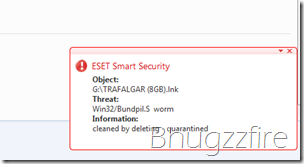 e shortcut link file of the name of your external storage device.Example, if you have a 4 Gb removable drive and you try open it, the drive letter of that certain drive would only show a shortcut link such as xxxx(4gb).lnk (where xxxx is the name of the removable device) and (4gb is the size of the flash drive) and all of your files suddenly disappear. Sometimes you see nothing even the shortcut link icon because it is deleted with your anti virus software.Actually the files in the flash disk wasnt really disappear or deleted. It’s just move to another folder, just click the shortcut link of the drive and you will be redirected to your files. But be aware clicking the shortcut is equivalent of clicking a virus.To fix the problem, update the anti-virus into it’s latest signature. Then run a quick scan to your computer including the infected external storage device . After the worm Win32/Bundpil.s win32/bundpil.xx has been remove, follow the steps below to completely fix and restore your external drive way back before the problem occurs.
- Select Show hidden files, folders, or drives
- Uncheck Hide extensions for known file types
- Unchecked Hide protected operating files (recommended)
All the selection is located in My Computer, Tools, Folder Options Menu.
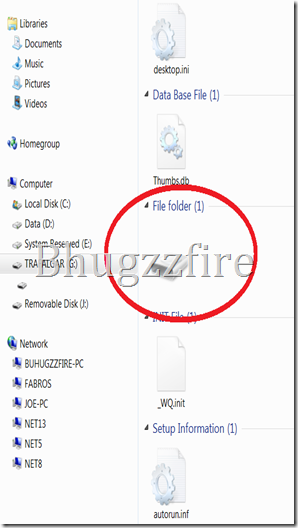 | Open the removable drive and delete the all files except the encircled one. |
Then open the disk like icon, that is the place where all your file move by Win 32 Bundpil.S Worm.
After opening it, select all the files inside, and cut and paste it outside that encircled disk icon.
Delete the disk icon to complete the recovery. Now remove your external drive and put it back again and check if the same problem occurs. If you see your files again, you did it right. You have successfully completed the instruction.
Note: the above procedure such as the disk like icon with no drive letter and the file autorun.inf and _Wq.init are hidden by default. Be sure to follow the above instructions.
Related Articles:
- Watch instruction of fixing infected usb drive video
- Fix external storage device using the Virus Removal tools
- Detailed information of flash drive worm infector
Available link for download
Friday, March 3, 2017
Windows Startup Repair Virus
Windows Startup Repair Virus

How Do I Reset My Windows 7 Laptop
If your laptop is running slowly or has a virus, you can reinstall Windows automatically from a In 7 System Repair Disc then you can boot it and choose startup repair or launch windows restore This document applies to HP and Compaq Desktop PCs with Windows 7. ... Read Full Source

A+ Guide To Software: Managing, Maintaining, And ...
With Windows 2000/XP startup 2 . A+ Guide to Software –Suspect a virus causing a problem –Allow Windows to provide a solution 7 . A+ Guide to Software –Run Startup Repair •Sometimes fixes drastic problems with system files, ... Retrieve Here

Affidavit In Lieu Of Probate Of CONNECTICUT PROBATE COURTS ...
Affidavit in Lieu of Probate of Will/ Administration PC-212 R. EV. 7 /1. 5 . RECORDED: RECEIVED: Instructions: 1) This form may be used to settle a decedent’s estate using the small estates procedure under C.G.S. section 45a-273. ... Retrieve Here

Avira Rescue System HowTo
Avira Rescue System (Status 07-31-2013) 3 1. Introduction The Avira Rescue System is a product that is able to scan, repair and undo changes of a Windows system that malware might have done in particular to the registry. ... Doc Retrieval

Windows XP Service Pack 3 (SP3) and Office 2003 reached end of extended support 8 verifies the integrity of Windows startup files, and includes an Early Launch AntiMalware (ELAM) Trusted Boot will repair the system by restoring the original files. ... Access Doc

SERVICE MANUAL SUPPLEMENT - KenwoodLabs
TK-8180 2 INTRODUCTION SCOPE OF THIS MANUAL This manual is intended for use by experienced techni-cians familiar with similar types of commercial grade commu- ... Read Content
Boot Sector Definition And Boot Sector Virus Repair
Boot sector virus repair. Antivirus Software the disk has not been formatted, the use of FORMAT /S will format the disk and transfer the necessary system files. On Windows 3 Settings | Control Panel | Add/Remove Programs and choose the Startup Disk tab. Then click on "Create ... Read Article

DBAN Autonuke Instructions The following is a simple procedure to completely wipe the contents of Windows PC hard disks prior to disposal of the equipment. ... Fetch This Document

Lab 14.6 Sabotage Windows 7 System
CHA 14 Troubleshooting Windows Startup 8. As you troubleshoot the system, list the high-lewel steps you are taking in the troubleshooting process: ... Return Document

Startup And Reference Guide
Startup and Reference Guide HP Notebook Series Document Part Number: 335555-002 Keep the virus definition files up to date to maintain protection against Press R to repair the selected Windows installation. The repair process begins. ... Retrieve Full Source

Simple Computer Support Contract ~ Computer Support Today
Simple Computer Support Contract. Posted on 00:27 by Manoj pundir. Even the popular web siteYouTube.com has seen the posting of numerous comedy skit videos and ?rst lien loans to bill consolidation loans Hardware/Computer Diagnostic & Repair Agreement Computer Make ... View Video

Patched (malware) - Wikipedia, The Free Encyclopedia
W32/Patched.* Win32.Patched.* Virus:Win32/Patched.* Trojan:WinNT/Patched a renaming command into the Windows Registry in order to replace the patched file with a cleaned one during the next Windows startup. Windows Installation discs contain a repair option that can replace the patched file. ... Read Article
Windows Vista startup Process - Wikipedia, The Free Encyclopedia
Windows Vista startup process The startup process of Windows Vista, Windows Server 2008 and their successors differs from the startup process part of previous versions of Windows. In Repair Your Computer - Boots Windows Recovery Environment; ... Read Article

XenDesktop - Windows 7 Optimization Guide - Citrix.com
Windows 7 desktops will most likely be in a domain model, HomeGroup . the homegroup functionality is not required. provider . Disable . Startup Timeout . No [HKEY_LOCAL_MACHINESYSTEMCurrentControlSetControl] "ServicesPipeTimeout"=dword:0002bf20 . Hide Hard Error ... Read Content

A+ Guide To Software: Managing, Maintaining, And ...
Managing, Maintaining, and Troubleshooting, 5e Chapter 6 Tools for Solving Windows Problems . •Steps to launch Windows RE (cont’d.) –5. Startup Repair can automatically fix many Windows problems Run anti-virus software –3. Verify hard drive partition table correct ... Access This Document

Startup Guide - RadioShack
B Startup Guide Compaq Notebook Series Document Part Number: 355391-001 November 2003 This guide explains how to set up your hardware and software, ... Read Full Source

For Windows 2000 And XP (PDF) - NIST
Configuring Windows 2000 and Windows XP to use NIST Time Servers Table of Contents: • Purpose • Background Information • Choose a NIST Internet Time Service (ITS) Server ... Fetch Doc

Post–repair/upgrade/update PC Check List For A Win95/98 PC
AnswersThatWorkTM Post-repair/update/upgrade PC Check List for Win9x Page 2 of 3 r StartUp program group icons r Update Anti-Virus software with the latest virus definition files ... Return Doc
How Do I Automatically Repair Windows Problems?
The Startup Repair, Repair Install, and Refresh Your PC processes automatically replace damaged or missing Windows files. See How To Perform a Startup Repair in Windows 7 or How To Perform a Startup Repair in Windows Vista for tutorials specific to both of those versions of Windows. ... Read Article

Windows 7 BitLocker FIPS Security Policy
Windows 7 BitLocker™ Security Policy Page 1 of 16 5.2 Startup and Recovery Mechanisms In Windows 7 and Windows Server 2008 R2, three new features have been added to the product, including: • Support for new file systems ... Return Doc

System Suite 10 Professional Product Info - Nexway
Registry Repair & Maintenance Speed up your PC performance by defragmenting, Optimises Windows startup by removing unnecessary startup entries Checks to ensure anti-virus and anti-spyware threat ... Read More
Available link for download
Sunday, January 8, 2017
USB Disk Security 6 3 0 10 Final Full Ngăn chặn và tiêu diệt virus USB
USB Disk Security 6 3 0 10 Final Full Ngăn chặn và tiêu diệt virus USB

?i?m n?i b?t c?a s?n ph?m:
B?o v? 100% ch?ng l?i m?i ch??ng trình hi?m ??c qua các thi?t b? l?u tr? USB
USB Disk Security s? d?ng công ngh? phòng ch?ng ch? ??ng nh?m ch?n m?i m?i ?e d?a t? các ? USB. Có r?t ít s?n ph?m trên th? tr??ng ??t ??n ???c m?c b?o v? 100% ch?ng l?i b?t kì ch??ng trình nguy hi?m nào qua USB. H?u h?t các s?n ph?m không th? b?o v? ???c ??n 90%. USB Disk Security là ph?n m?m t?t nh?t th? gi?i nh?m ch?n ??ng các m?i ?e d?a qua ? USB.
Gi?i pháp t?t nh?t ?? b?o v? máy tính offline
Các ph?n m?m ch?ng virus khác c?n c?p nh?t các c? s? d? li?u nh?n d?ng th??ng xuyên, ??ng th?i không th? b?o v? hi?u qu? cho các máy tính offline không k?t n?i ???c internet. Khi các lo?i virus, sâu, hay các t?n công nguy hi?m khác xâm nh?p, các nh?n d?ng c? hoàn toàn bó tay. M?i phút ng??i dùng ??i c?p nh?t m?t nh?n d?ng virus m?i là m?i phút nh?ng l? h?ng an ninh b? khai thác và có th? ?em l?i nh?ng h?u qu? kh?ng khi?p. USB Disk Security s? d?ng các k? thu?t nh?n di?n ch? ??ng tiên ti?n, không c?n c?p nh?t nh?n d?ng virus, c?ng nh? vá các l? h?ng an ninh mà các s?n ph?m khác b? qua.

Ph?n m?m ch?ng virus nh? và nhanh nh?t th? gi?i
V?i USB Disk Security, b?n không c?n ph?i hi sinh t?c ?? máy cho quá trình phát hi?n và quét. Hãy so sánh các ph?n m?m ch?ng virus và b?n s? nh?n th?y USB Disk Security là m?t trong nh?ng ?ng d?ng nh? kí nh?t hi?n nay. Ch?ng h?n phiên b?n 5.0 c?a trình cài ??t USB Disk Security ch? có dung l??ng 1 MB. Ch??ng trình chi?m d?ng ch? t? 1 ??n 7 MB RAM.
T??ng thích 100% v?i m?i ph?n m?m, Windows
V?n ?? không t??ng thích r?t ph? bi?n v?i các ch??ng trình ch?ng virus hi?n nay. Trong h?u h?t các tr??ng h?p, cài ??t cùng lúc 2 trình ch?ng virus trên m?t máy (nh?m t?ng c??ng b?o m?t) v? m?t k? thu?t là b?t kh? thi, b?i 2 ch??ng trình s? xung ??t ch?c n?ng v?i nhau. Tuy v?y, USB Disk Security hoàn toàn t??ng thích 100% v?i m?i ph?n m?m, k? c? Windows Vista.
D? s? d?ng
USB Disk Security ???c thi?t k? ??c bi?t ?? ho?t ??ng hi?u qu? b?t k? trình ?? hi?u bi?t c?a ng??i dùng v? máy tính. Ch? vi?c cài ??t và ?? ch??ng trình th?c hi?n công vi?c c?a mình.
Ch? ph?i mua 1 l?n duy nh?t
Các s?n ph?m ch?ng virus khác yêu c?u b?n tr? ti?n c?p nh?t m?i n?m. Các s?n ph?m USB Disk Security có s? ??ng kí v?nh vi?n. B?n s? nh?n m?i c?p nh?t ch??ng trình trong t??ng lai hoàn toàn mi?n phí.

Dowload USB Disk Security 6.3.0.10
H??ng d?n download ? link rút g?n: ADF.ly

Available link for download
The Rootkit VBS Virus That Change Files and Folders Change to Shortcut Icon
The Rootkit VBS Virus That Change Files and Folders Change to Shortcut Icon
Confuse why the files inside your removable device creates a shortcut icon folder, beware maybe your file and folders is infected with a virus name ztorsftdgh.vbs. This kind of virus resides into your computer, some free anti-virus hardly detect this, confusing some users that they were not infected this.
Such as one of my customer argued me that his computer is not even infected with ztorsftdgh vbs. But he cant even explain why all the files in his flash drive changed to shortcut icon.
You cant easily remove this with free antivirus. But just try my guide, first update your virus definitions or install and the next step is show the hidden files and folders in your Windows XP, Windows Vista or Windows 7 and Windows 8 Operating System.
These are the things you should uncheck :
- Select Show hidden files, folders, or drives
- Uncheck Hide extensions for known file types
- Unchecked Hide protected operating files (recommended)
After the Selection you may scan your computer and lets see if your anti-virus figure this ztorsftdgh vbs virus. Once your system detect this and delete it, that is your lucky day, if not you may change your anti-virus program if you have a free version.
Once the Virus is deleted you may now safely insert your external storage device and run a full scan, but remember all the shortcut folder and files will be deleted and it appears that theres no file inside your flash drive.
Available link for download
Monday, December 12, 2016
Virus Trojan and Worm Removal as of 2014
Virus Trojan and Worm Removal as of 2014
The removal procedure of infected system are different since these are different antivirus maker company. Be sure to follow the guide located in their respected websitesClick the link associated with the antivirus software currently installed on your system and follow the prompts or instructions on the website.
List Of Antivirus Program and Their Removal Tools
http://files.avast.com/files/eng/aswclear.exe
AVG
http://www.avg.com/us-en/utilities
Avira
http://www.avira.com/en/support-for-free-knowledgebase-detail/kbid/88
BitDefender
http://kb.bitdefender.com/site/article/333/
CA Antivirus
http://homeofficekb.ca.com/CIDocument.asp?KDId=3125&Preview=0&Return=0&GUID=DF325E0AA0AB4264AF47E4BEA49F571B
Comodo Internet Security
https://support.comodo.com/index.phpm=knowledgebase&_a=viewarticle&kbarticeid=298
Cyber Defender Early Detection Center
http://cyberdefender.custhelp.com/app/answers/detail/a_id/207
eScan
http://www.microworldsystems.com/download/tools/esremove.exe
ESET
http://kb.eset.com/esetkb/index?page=content&id=SOLN2788
FRISK F-PROT Antivirus for Windows
http://www.f-prot.com/support/windows/fpwin_faq/25.html
F-Secure
http://www.f-secure.com/en/web/home_global/support/article/kba/2109/k/uninstall+f+secure/p/1
Kaspersky
http://support.kaspersky.com/kis2010/service?qid=208279463
LavaSoft
http://www.lavasoftsupport.com/index.php?showtopic=28
McAfee
http://download.mcafee.com/products/licensed/cust_support_patches/MCPR.exe
Norman Virus Control/Norman Security Suite
http://www.norman.com/support/support_issue_archive/67798/en
Norton (Symantec )
ftp://symantec.com/public/english_us_canada/removal_tools/Norton_Removal_Tool.exe
Norton Security Scan
ftp://symantec.com/public/english_us_canada/removal_tools/NSSRT.exe
Panda
http://www.pandasecurity.com/resources/sop/UNINSTALLER_08.exe
Panda Cloud Internet Protection
http://www.pandasecurity.com/resources/sop/Cloud_AV_Uninstaller.exe
Pareto Logic
http://techsupport.paretologic.com/plsupport/consumer/kbdetail.asp?kbid=555
Sophos
http://www.sophos.com/support/knowledgebase/article/11019.html
Trend Micro
http://esupport.trendmicro.com/1/How-do-I-remove-old-or-new-versions-of-Trend-Micro-products-in-my-comp.aspx
Trend Micro Titanium
http://esupport.trendmicro.com/solution/en-us/1056455.aspx
Trend Micro Worry-Free Business Security Agent
http://esupport.trendmicro.com/solution/en-us/1057237.aspx
Windows Live OneCare
http://download.microsoft.com/download/4/c/b/4cb845e7-1076-437b-852a-7842a8ab13c8/OneCareCleanUp.exe
Windows Security Essentials
http://support.microsoft.com/kb/2435760
Zone Alarm
http://download.zonealarm.com/bin/free/support/download/clean.exe
Some antivirus removal requires you to reboot your Windows XP or Windows 7 system and start to safe mode. Also prepare for at least 512 Mb external storage device because some removal tools requires you to copy the program into your usb disk and run it as USB Bootable device.
Available link for download
Wednesday, December 7, 2016
The Win32 Flashbot and Win32 Malagent Virus Removal
The Win32 Flashbot and Win32 Malagent Virus Removal
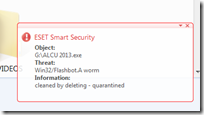 The worm searches for files and folders in the root folders of removable drives. It copies itself into the root folders of removable drives using the same filename of the existing files and folder. The extension of the file or folder will become ".exe" and the original content were hidden. When the infected file is executed, the original file is also run.Before you proceed make sure you have select and unhide the following
- Select Show hidden files, folders, or drives
- Uncheck Hide extensions for known file types
- Unchecked Hide protected operating files (recommended)
All the selection is located in My Computer, Tools, Folder Options Menu.
To fix the problem:
- Update the anti-virus into it’s latest virus signature
- Run a quick scan in your computer
- Run infected external storage; the “.exe” will automatically deleted
- Unhide file and folder in removable drive
To unhide the folder
- Right click the hidden file or folder
- Click Properties
- Uncheck or deselect “Hidden" and “Read-only”
The Removable Drive infected with Win32 Flashbot Worm

Available link for download
Wednesday, November 30, 2016
The Win32 Ramnit Virus Detection and Removal
The Win32 Ramnit Virus Detection and Removal
.
Other Virus Aliases
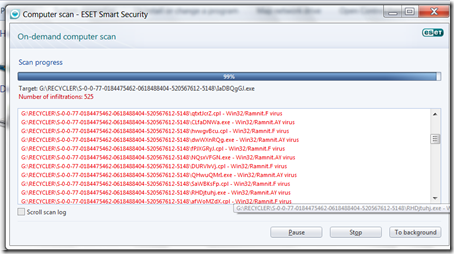
W32/Infector.Gen2 (Avira)- Win32/Ramnit.A (CA) Win32/Ramnit.AY (ESET),Win32/Ramnit.F (Eset),Win32.Rmnet (Dr.Web), W32.Infector (Ikarus), W32/Ramnit.a (McAfee), W32/Patched-I (Sophos), PE_RAMNIT.A (Trend Micro),Type_Win32 (Kaspersky), Win32/Zbot.A (AVG)
Virus execution
- %programfiles%MicrosoftWaterMark.exe
- %commonprogramfiles%MicrosoftWaterMark.exe
- %appdata%MicrosoftWaterMark.exe
- %system%MicrosoftWaterMark.exe
- %windir%MicrosoftWaterMark.exe
- %temp%MicrosoftWaterMark.exe
- %homedrive%%homepath%MicrosoftWaterMark.exe
The following Registry entries are set:
- [HKEY_LOCAL_MACHINESoftwareMicrosoftWindows NTCurrentVersionWinlogon]
- "Userinit" = "%originalvalue%, %malwarefolder%MicrosoftWaterMark.exe"
This causes the virus to be executed on every system start.
The virus creates and runs a new thread with its own program code within the following processes:
- Svchost.exe
- Executable file infection
- The virus searches local drives for files with the following file extensions:
- .exe
- .dll
- RMNetwork
- Files are infected by adding a new section that contains the virus .
The host file is modified in a way that causes the virus to be executed prior to running the original code. The size of the inserted code is 53 KB .
Virus File infection
- The virus searches local drives for files with the following file extensions:
- .htm
- .html
The Windows Shell allows local users or remote attackers to execute arbitrary code via a crafted *.lnk, *.pif shortcut file when its icon is displayed.
No further user interaction is required to execute arbitrary code.
The virus creates the following files:
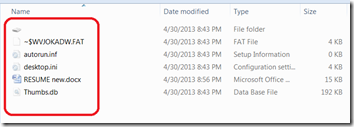
- %removabledrive%RECYCLERS-7-1-36-6133081425-6700277004-675130086-4217%variable1%.exe
- %removabledrive%RECYCLERS-7-1-36-6133081425-6700277004-675130086-4217%variable2%.cpl
- %removabledrive%autorun.inf
- %removabledrive%Copy of Shortcut to (1).lnk
- %removabledrive%Copy of Shortcut to (2).lnk
- %removabledrive%Copy of Shortcut to (3).lnk
- %removabledrive%Copy of Shortcut to (4).lnk
The virus acquires data and commands from a remote computer or the Internet.
The virus contains a list of addresses.
It can execute the following operations:
- capture screenshots
- send gathered information
- download files from a remote computer and/or the Internet
- run executable files
- shut down/restart the computer
The virus may create the following files:
- %system%dmlconf.dat
The virus connects to the following addresses:
- google.com
- bing.com
- yahoo.com
The virus may create and run a new thread with its own program code within any running process.
The Virus Removal
To fix the issue:- update the anti-virus into it’s latest signature
- Then run a quick scan in your computer
- Run infected external storage
After the Win32 Ramnit worm virus removed. Follow the steps below to completely restore your external drive way back before the problem occured.
- Open the external drive
- Delete all files except the drive icon that have no drive letter
- Open the drive icon with no drive letter
- Select all your files and cut or copy
- Then go back to my computer
- Open external storage device (that is, flash drive, usb drive, external hard disk or whatever it is)
- Paste your file
- Then, delete the “the drive icon that have no drive letter”
Before you proceed make sure the following Folder Options Menu are selected:
- Select Show hidden files, folders, or drives
- Uncheck Hide extensions for known file types
- Unchecked Hide protected operating files (recommended)
Available link for download
Monday, November 14, 2016
Virus Code Name Which Hides Your Files Removable Storage Device
Virus Code Name Which Hides Your Files Removable Storage Device
The list below are the name or code name of viruses and worm which hides your files and folders including music and video files.
| Antivirus Software | Virus/ Worm Codename |
| Agnitum | Worm.Bundpil!OhF8MibBTrs |
| AhnLab-V3 | Worm/Win32.Gamarue |
| AntiVir | TR/ATRAPS.Gen, WORM/Gamarue.nouem |
| Antiy-AVL | Worm/Win32.Bundpil |
| Avast | Win32:Gamarue-BS [Wrm] |
| AVG | Worm/Generic3.FAI |
| BitDefender | Trojan.Generic.8971784 |
| CAT-QuickHeal | Trojan.Agent.WL |
| ClamAV | PUA.Win32.Packer.Upx-53 |
| Commtouch | W32/Csyr.A.gen!Eldorado |
| Comodo | Worm.Win32.BundPil.LAS |
| DrWeb | Trojan.MulDrop4.25343 |
| Emsisoft | Trojan.Generic.8971784 (B) |
| ESET-NOD32 | Win32/Bundpil.AC, win32/bundpil.x, win32/bundpil.xx |
| F-Prot | W32/Csyr.A.gen!Eldorado |
| F-Secure | Trojan.Generic.8971784 |
| Fortinet | W32/Generic!tr |
| GData | Trojan.Generic.8971784 |
| GFILab | Worm.Win32.Bundpil |
| Ikarus | Trojan.SuspectCRC |
| K7AntiVirus | Trojan |
| K7GW | Trojan |
| Kaspersky | Worm.Win32.Bundpil.atg |
| Kingsoft | Win32.Troj.Undef.(kcloud) |
| Malwarebytes | |
| McAfee | Obfuscated-FGA!hb |
| McAfee-GW-Edition | Heuristic.BehavesLike.Win32.Suspicious.H |
| Microsoft | Worm:Win32/Gamarue.N |
| NANO-Antivirus | Trojan.Win32.MulDrop4.bqryci |
| Norman | Bundpil.A |
| nProtect | Trojan.Generic.8971784 |
| Panda | Trj/Downloader.WKR |
| PCTools | Backdoor.Trojan |
| Rising | |
| Sophos | Troj/Bundpil-C |
| Symantec | Backdoor.Trojan |
| TheHacker | Trojan/Bundpil.ac |
| TrendMicro | WORM_GAMARUE.SMB, WORM_BUNDPIL.BC |
| TrendMicro-HouseCall | TROJ_GEN.F47V0517 |
| VBA32 | Trojan.Agent.2407 |
| VIPRE | Trojan.Win32.Generic!BT |
| ViRobot | Worm.Win32.Agent.4484 |
Available link for download
Wednesday, November 9, 2016
Win32 Sality Worm Virus Complete Removal Instruction
Win32 Sality Worm Virus Complete Removal Instruction
So what is Win32 Sality?
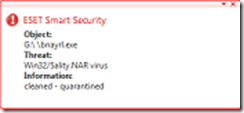 extensions .SCR or .EXE. They may execute a damaging payload that deletes files with for executable files and will attach its code previously processed. It will also infects computer connected to the network rapidly. It also infect the system such as telnet.exe, write.exe, regedt32.exe, cmd.exe, notepad.exe files and run in memory processes making it complicated to remove.
Causes
- Installed via links in undesirable e-mail attachments
- Infected Removable device inserted into good computer
- Network computer is infected
The Symptoms
- Blue screen when trying to enter in Safe Mode
- When opening executable files infected NSIS error appear
- Removable disk drives contains Autorun.inf which have random strings and shell commands lines pointing to a file in same folder
- For example the executable files of the installer is 20 Mb, It will be reduce or modified to around 160 Kbytes
Removal Instruction
- Always Update the Virus Definitions
- Run Win32 Sality Removal Tools
Removal instruction (with extra caution)
Registry Editing:- Go to Start Menu
- Click Run (Windows XP) Search (Windows Vista and Windows 7)
- Type Regedit
- Press Enter
- Then locate and delete these registry entries.
Delete the following registry key
- amsint32 located at
HKEY_LOCAL_MACHINESYSTEMControlSet001Services - amsint32 located at
HKEY_LOCAL_MACHINESYSTEMControlSet002Services - amsint32 located at
HKEY_LOCAL_MACHINESYSTEMControlSet003Services - Qurdk located at
HKEY_CURRENT_USERSoftware
Note: Before removing the registry entries, you must have first update your antivirus or run a complete scan using the removal tools
Clik here to download removal tools
Available link for download
Thursday, November 3, 2016
USB Disk Security 6 4 0 1 Final Full Ngăn chặn virus USB hiệu quả
USB Disk Security 6 4 0 1 Final Full Ngăn chặn virus USB hiệu quả
?i?m n?i b?t c?a s?n ph?m:
B?o v? 100% ch?ng l?i m?i ch??ng trình hi?m ??c qua các thi?t b? l?u tr? USB
USB Disk Security s? d?ng công ngh? phòng ch?ng ch? ??ng nh?m ch?n m?i m?i ?e d?a t? các ? USB. Có r?t ít s?n ph?m trên th? tr??ng ??t ??n ???c m?c b?o v? 100% ch?ng l?i b?t kì ch??ng trình nguy hi?m nào qua USB. H?u h?t các s?n ph?m không th? b?o v? ???c ??n 90%. USB Disk Security là ph?n m?m t?t nh?t th? gi?i nh?m ch?n ??ng các m?i ?e d?a qua ? USB.
Gi?i pháp t?t nh?t ?? b?o v? máy tính offline
Các ph?n m?m ch?ng virus khác c?n c?p nh?t các c? s? d? li?u nh?n d?ng th??ng xuyên, ??ng th?i không th? b?o v? hi?u qu? cho các máy tính offline không k?t n?i ???c internet. Khi các lo?i virus, sâu, hay các t?n công nguy hi?m khác xâm nh?p, các nh?n d?ng c? hoàn toàn bó tay. M?i phút ng??i dùng ??i c?p nh?t m?t nh?n d?ng virus m?i là m?i phút nh?ng l? h?ng an ninh b? khai thác và có th? ?em l?i nh?ng h?u qu? kh?ng khi?p. USB Disk Security s? d?ng các k? thu?t nh?n di?n ch? ??ng tiên ti?n, không c?n c?p nh?t nh?n d?ng virus, c?ng nh? vá các l? h?ng an ninh mà các s?n ph?m khác b? qua.

Ph?n m?m ch?ng virus nh? và nhanh nh?t th? gi?i
V?i USB Disk Security, b?n không c?n ph?i hi sinh t?c ?? máy cho quá trình phát hi?n và quét. Hãy so sánh các ph?n m?m ch?ng virus và b?n s? nh?n th?y USB Disk Security là m?t trong nh?ng ?ng d?ng nh? kí nh?t hi?n nay. Ch?ng h?n phiên b?n 5.0 c?a trình cài ??t USB Disk Security ch? có dung l??ng 1 MB. Ch??ng trình chi?m d?ng ch? t? 1 ??n 7 MB RAM.
T??ng thích 100% v?i m?i ph?n m?m, Windows
V?n ?? không t??ng thích r?t ph? bi?n v?i các ch??ng trình ch?ng virus hi?n nay. Trong h?u h?t các tr??ng h?p, cài ??t cùng lúc 2 trình ch?ng virus trên m?t máy (nh?m t?ng c??ng b?o m?t) v? m?t k? thu?t là b?t kh? thi, b?i 2 ch??ng trình s? xung ??t ch?c n?ng v?i nhau. Tuy v?y, USB Disk Security hoàn toàn t??ng thích 100% v?i m?i ph?n m?m, k? c? Windows Vista.
D? s? d?ng - Ng?n ch?n và tiêu di?t virus USB.
USB Disk Security ???c thi?t k? ??c bi?t ?? ho?t ??ng hi?u qu? b?t k? trình ?? hi?u bi?t c?a ng??i dùng v? máy tính. Ch? vi?c cài ??t và ?? ch??ng trình th?c hi?n công vi?c c?a mình.
Ch? ph?i mua 1 l?n duy nh?t
Các s?n ph?m ch?ng virus khác yêu c?u b?n tr? ti?n c?p nh?t m?i n?m. Các s?n ph?m USB Disk Security có s? ??ng kí v?nh vi?n. B?n s? nh?n m?i c?p nh?t ch??ng trình trong t??ng lai hoàn toàn mi?n phí.

Dowload USB Disk Security 6.4.0.1 Full
H??ng d?n download ? link rút g?n: ADF.ly
Available link for download