Showing posts with label device. Show all posts
Showing posts with label device. Show all posts
Thursday, March 9, 2017
Track the Existence of Android Smartphone from Another Device
Track the Existence of Android Smartphone from Another Device
 Lost cell phone is certainly very annoying. And for those of you who have a lot of important and valuable data, the loss feels the more suffocating. In addition to later have to reassemble the data, the data will be utilized at the time are not responsible is the other things that could make the more giddy.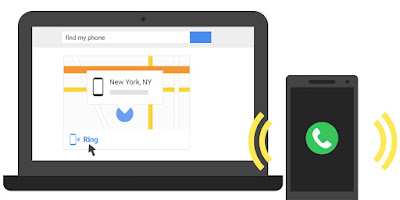
But the sophistication of mobile phones as well as the latest operating system at this time gives little hope indeed will be a clue as to its existence. Although it takes several terms to find it, at least you still have a way that can be tried. In addition to monitoring the whereabouts of a cell phone, there is another feature that allows to remove or lock the data remotely in order to avoid the possibility of hacking the data. Here are a few things to be prepared as well as the steps that must be done:
Getting started on Android phone
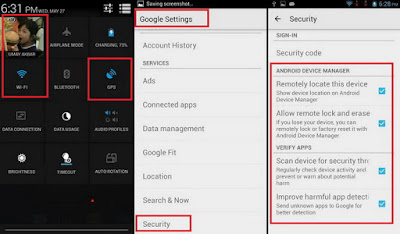
Before you lose your mobile phone (hopefully this does not happen), you must first prepare the configuration can be useful if the bad stuff happens.
- Turn on your Google account on the mobile phone
- Turn on the GPS location or function
- Turn on the internet connection (can use data or Wi-Fi)
- Google Settings, go to Security, and enable all featured with tick marks.
Detect of the existence of another Android phone
To monitor the whereabouts of the other mobile phone, do the following:
- Install Android Device Manager apps Google-made to be had from Google Play Store.
- Click Accept on each aggrement displayed on the initial configuration.
- Log in using the same Google account with the Android that will be monitored.
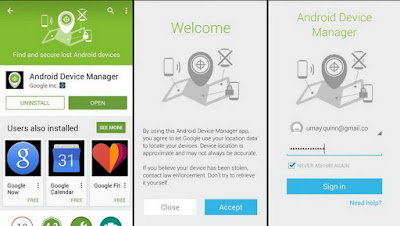
- If ever enable some phones using your Google account, then before you have to select the first cell phone that will be monitored. Press the phone list.
- If true, then the application will instantly detect its presence by displaying your location via a map.
- In addition, there are three features that can be used i.e., Ring, Lock, and Erase. Featured Ring will send a ringing sound to the phone so that you can easily find it if tucked or unknown whereabouts.
- Featured Lock will lock the phones in question so that others cannot open it for not knowing the keywords you use.
- Featured Erase can be used if you dont want the data stored is used by other people.
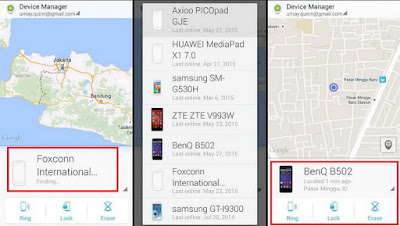
Detection of the desktop browser
If using a computer, it can also monitor the existence of Android phones from your browser.
- Access to the address https://www.google.com/android/devicemanager.
- Log in using the same Google account with the Android phones.
- Select the type of phone, the application will automatically mengontal the existence of the phone.
- If successful will be shown the address of the sites existence as well as featured
Available link for download

Monday, November 14, 2016
Virus Code Name Which Hides Your Files Removable Storage Device
Virus Code Name Which Hides Your Files Removable Storage Device
The list below are the name or code name of viruses and worm which hides your files and folders including music and video files.
| Antivirus Software | Virus/ Worm Codename |
| Agnitum | Worm.Bundpil!OhF8MibBTrs |
| AhnLab-V3 | Worm/Win32.Gamarue |
| AntiVir | TR/ATRAPS.Gen, WORM/Gamarue.nouem |
| Antiy-AVL | Worm/Win32.Bundpil |
| Avast | Win32:Gamarue-BS [Wrm] |
| AVG | Worm/Generic3.FAI |
| BitDefender | Trojan.Generic.8971784 |
| CAT-QuickHeal | Trojan.Agent.WL |
| ClamAV | PUA.Win32.Packer.Upx-53 |
| Commtouch | W32/Csyr.A.gen!Eldorado |
| Comodo | Worm.Win32.BundPil.LAS |
| DrWeb | Trojan.MulDrop4.25343 |
| Emsisoft | Trojan.Generic.8971784 (B) |
| ESET-NOD32 | Win32/Bundpil.AC, win32/bundpil.x, win32/bundpil.xx |
| F-Prot | W32/Csyr.A.gen!Eldorado |
| F-Secure | Trojan.Generic.8971784 |
| Fortinet | W32/Generic!tr |
| GData | Trojan.Generic.8971784 |
| GFILab | Worm.Win32.Bundpil |
| Ikarus | Trojan.SuspectCRC |
| K7AntiVirus | Trojan |
| K7GW | Trojan |
| Kaspersky | Worm.Win32.Bundpil.atg |
| Kingsoft | Win32.Troj.Undef.(kcloud) |
| Malwarebytes | |
| McAfee | Obfuscated-FGA!hb |
| McAfee-GW-Edition | Heuristic.BehavesLike.Win32.Suspicious.H |
| Microsoft | Worm:Win32/Gamarue.N |
| NANO-Antivirus | Trojan.Win32.MulDrop4.bqryci |
| Norman | Bundpil.A |
| nProtect | Trojan.Generic.8971784 |
| Panda | Trj/Downloader.WKR |
| PCTools | Backdoor.Trojan |
| Rising | |
| Sophos | Troj/Bundpil-C |
| Symantec | Backdoor.Trojan |
| TheHacker | Trojan/Bundpil.ac |
| TrendMicro | WORM_GAMARUE.SMB, WORM_BUNDPIL.BC |
| TrendMicro-HouseCall | TROJ_GEN.F47V0517 |
| VBA32 | Trojan.Agent.2407 |
| VIPRE | Trojan.Win32.Generic!BT |
| ViRobot | Worm.Win32.Agent.4484 |
Available link for download
Tuesday, October 18, 2016
Trick To Recover Deleted SMS From Your Nokia Device
Trick To Recover Deleted SMS From Your Nokia Device
Hello Friends..
This Is very important in todays life, I hope You Find It Interesting.In todays scenario every one have a cell phone even a 15 years buddy also.Cell phones Are The Very Best thing To keep in contact with Your dear ones. But sometimes We face some problems just because of these.
Have You Ever Faced A situation like in which You have stored some Important messages in your inbox and accidentally the message got deleted.
I Think "Yes"....Almost Everyone Faced This..So Today I will Show You how To Recover deleted SMS from Your Nokia Device.By using This Trick You can Able To Recover Your Deleted Sms For Your Nokia Symbian Device..
if you are Using a Java Based Nokia Phone Then Go To Bottom of this Post Where You will Find A Link To my other article to Recover Deleted SMS From your Java Based Phones.
Lets Begin...
Note: this trick does not work on Symbian 3rd Edition
cellphones Like N73 e.t.c.
If You Want Same Trick For Your Java Enabled Cell Phone Like Nokia 5300,5233,3500 And So On..
Then Read My our other Trick To Recover Deleted SMS From Java Based Cell Phone From Here...
This Is very important in todays life, I hope You Find It Interesting.In todays scenario every one have a cell phone even a 15 years buddy also.Cell phones Are The Very Best thing To keep in contact with Your dear ones. But sometimes We face some problems just because of these.
Have You Ever Faced A situation like in which You have stored some Important messages in your inbox and accidentally the message got deleted.
I Think "Yes"....Almost Everyone Faced This..So Today I will Show You how To Recover deleted SMS from Your Nokia Device.By using This Trick You can Able To Recover Your Deleted Sms For Your Nokia Symbian Device..
if you are Using a Java Based Nokia Phone Then Go To Bottom of this Post Where You will Find A Link To my other article to Recover Deleted SMS From your Java Based Phones.
Lets Begin...
- First Download FExplorer From Here..
http://www.gosymbian.com/FE_download.html
And Install It On Your Phone..
- Launch FExplorer and navigate to
C: if you use Phone Memory to
store your messages (default) and
D: if you use Storage Card as your
SMS storage location.
store your messages (default) and
D: if you use Storage Card as your
SMS storage location.
- Now navigate to and open "system” folder.
- Now open the "mail” folder.This folder should contain manyfolders named similar to 0010001_s etc. with files named similar to 00100000 etc., These files are the actual deleted messages.
- use FExplorer inbuild text viewer to view these files, You will need to browse through every folder and open all files inside them until you get the required SMS.
Note: this trick does not work on Symbian 3rd Edition
cellphones Like N73 e.t.c.
If You Want Same Trick For Your Java Enabled Cell Phone Like Nokia 5300,5233,3500 And So On..
Then Read My our other Trick To Recover Deleted SMS From Java Based Cell Phone From Here...
Available link for download
Subscribe to:
Posts (Atom)