Showing posts with label android. Show all posts
Showing posts with label android. Show all posts
Thursday, March 9, 2017
Track the Existence of Android Smartphone from Another Device
Track the Existence of Android Smartphone from Another Device
 Lost cell phone is certainly very annoying. And for those of you who have a lot of important and valuable data, the loss feels the more suffocating. In addition to later have to reassemble the data, the data will be utilized at the time are not responsible is the other things that could make the more giddy.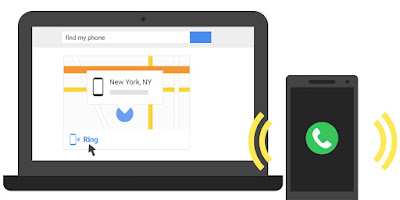
But the sophistication of mobile phones as well as the latest operating system at this time gives little hope indeed will be a clue as to its existence. Although it takes several terms to find it, at least you still have a way that can be tried. In addition to monitoring the whereabouts of a cell phone, there is another feature that allows to remove or lock the data remotely in order to avoid the possibility of hacking the data. Here are a few things to be prepared as well as the steps that must be done:
Getting started on Android phone
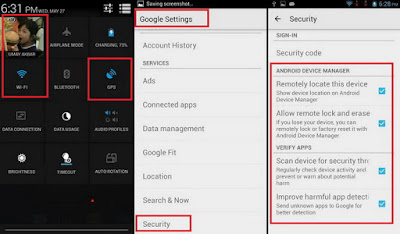
Before you lose your mobile phone (hopefully this does not happen), you must first prepare the configuration can be useful if the bad stuff happens.
- Turn on your Google account on the mobile phone
- Turn on the GPS location or function
- Turn on the internet connection (can use data or Wi-Fi)
- Google Settings, go to Security, and enable all featured with tick marks.
Detect of the existence of another Android phone
To monitor the whereabouts of the other mobile phone, do the following:
- Install Android Device Manager apps Google-made to be had from Google Play Store.
- Click Accept on each aggrement displayed on the initial configuration.
- Log in using the same Google account with the Android that will be monitored.
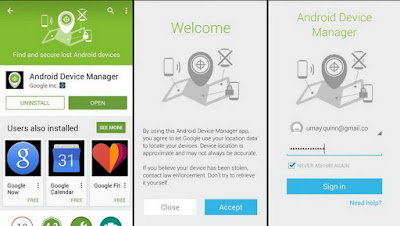
- If ever enable some phones using your Google account, then before you have to select the first cell phone that will be monitored. Press the phone list.
- If true, then the application will instantly detect its presence by displaying your location via a map.
- In addition, there are three features that can be used i.e., Ring, Lock, and Erase. Featured Ring will send a ringing sound to the phone so that you can easily find it if tucked or unknown whereabouts.
- Featured Lock will lock the phones in question so that others cannot open it for not knowing the keywords you use.
- Featured Erase can be used if you dont want the data stored is used by other people.
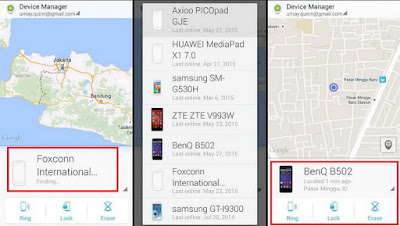
Detection of the desktop browser
If using a computer, it can also monitor the existence of Android phones from your browser.
- Access to the address https://www.google.com/android/devicemanager.
- Log in using the same Google account with the Android phones.
- Select the type of phone, the application will automatically mengontal the existence of the phone.
- If successful will be shown the address of the sites existence as well as featured
Available link for download

Uninstall Completely Remove Android x86 with Grub Loader
Uninstall Completely Remove Android x86 with Grub Loader
If youre one of them who have tried installing Android x86 alongside Windows and wanted to remove it later on, you might be freaked out when you to delete Android file in an attempt to remove it and youre greeted with an Error 15 on a dark screen whenever you try to start your PC. It will actually not boot into Windows because Android Grub loader that is responsible to give you options of which OS to go to was removed.
Dont Miss- Think twice before you sell your phone (Avast Recovered Nude Selfie from Android Phones).
I will guide you through the correct way to remove Android x86 herein so you can safely boot into Windows next time you start your computer.
Boot into windows first and check for android and grub folder it will be saved in that drive where you installed Android OS (Mostly in C: drive).
Delete Android-xxx folder along with Grub folder completely.
Now you will need Windows Installation disk or bootable flash drive to reinstall the Windows bootloader.
Check this out: How to earn 100$ in a day
Steps To Install Windows Bootloader:
- Restart PC and Boot into Windows Installation Disc or flash drive.
- Select a Language, Time and currency format, and keyboard or input method.
- Click on Repair your Computer and select the OS to repair and click Next.
- In system recovery options dialog box, click Command Prompt.
- Type Bootrec.exe/ FixMbr and hit Enter.
- Reboot again.
 |
Available link for download
Wednesday, March 8, 2017
Tips Mengatasi Android Yang Cepat Panas
Tips Mengatasi Android Yang Cepat Panas
 Bagi para pengguna smartphone android pasti semua pernah mengalami panas yang berlebihan pada smartphone android anda , padahal jarang dimainkan kok cepat panas ya ??? . Hal ini terjadi ketika android anda sudah melebihi batas kemampuan spesifikasi android atau sinyal operator sangat lemah.
Nah , Dengan demikian sebaiknya anda harus mengetahui batas temperature panas sehingga tidak terjadi ledakan pada smartphone android anda atau hal yang tidak diinginkan. untuk itu saya akan memberikan informasi kepada anda tentang beberapa penyebab yang biasanya membuat android anda cepat panas yang berlebihan.
Semoga tips dan cara di bawah ini dapat bermanfaat bagi anda sehingga nantinya Hp android anda tidak sering mengeluarkan panas yang berlebihan.
1. Kinerja yang berlebih
Dengan kemampuan android yang multitasking, terkadang anda membuka kamera, lalu social media seperti FB, Twitter, path, BBM dan anda memainkan Game HD. Dengan mempercepat proses CPU tentu akan mempercepat panas yang di timbulkan ke Smartphone anda. Sebaiknya anda memakai perangkat secara wajar dan jika bermain game yang ukurannya besar jangan terlalu lama memainkannya.
2.Memperhatikan Aplikasi apa saja yang sedang bekerja di background.
Di perangkat android, meskipun kita sudah mengeluarkan aplikasi dengan menekan tombol back berulang kali, ada beberapa aplikasi yang tetap terbuka pada beckground layar ponsel, padahal sejatinya kita sudah mengeluarkannya. Nah hal inilah yang bisa membuat perangkat anda cepat panas.
2.Memperhatikan Aplikasi apa saja yang sedang bekerja di background.
Di perangkat android, meskipun kita sudah mengeluarkan aplikasi dengan menekan tombol back berulang kali, ada beberapa aplikasi yang tetap terbuka pada beckground layar ponsel, padahal sejatinya kita sudah mengeluarkannya. Nah hal inilah yang bisa membuat perangkat anda cepat panas.
Solusinya: anda dapat mengeluarkan aplikasi itu dengan melakukan langkah sbb : klik setting pilih apps pilih running. disitulah anda dapat menutup aplikasi dengan aman dan tidak bekerja lagi.
3.Signal error
3.Signal error
Hal ini sering terjadi saat anda dan smartphone anda berada pada suatu tempat di pedalaman ataupun tempat dengan traffic jaringan yang padat. Hal ini akan berdampak pada kekuatan signal pada sartphone anda, smartphone anda pasti akan terus – menerus mencari signal dan menyebabkan smartphone cepat panas.
Cara mengatasi: Matikan jaringan internet atau nyalakan mode pesawat jika panas pada smartphone terus meningkat.
4. Kualitas Batrai
Kualitas batrai juga sangat mempengaruhi terhadap cepat panasnya perangkat. Dan biasanya jika batrai anda sudah berumur, maka akan cepat habis. usahakan ganti batrai yang sudah using dengan batrai ori .
5. Kotoran yang berlebih
Panas berlebihan pada smartphone anda dapat terjadi apabila ada debu ataupun kotoran yang menutupi saluran suhu panas untuk keluar pada smartphone anda. Tempat yang biasanya merupakan tempat pengeluaran suhu panas dan tempat penetralisir tersebut tersumbat kotoran. Jika memang benar, maka itu adalah salah satu penyebab smartphone anda cepat panas.
Cara mengatasinya: Bersihkan selalu tempat anda menyimpan smartphone anda, entah itu saku, tas, ataupun cover pelindung dari smartphone anda.
Demikian sedikit ulasan mengenai tips mengatasi android yang cepat panas.
Semoga bermanfaat.
Available link for download
Sunday, February 19, 2017
Video Tomtec Tablet Hangs at Android Startup Error
Video Tomtec Tablet Hangs at Android Startup Error
According to the web forum, the solution of this proble is just press the reset button. I tried this solution but it does not work. Holding the menu, power button, up and down volume does not work.
Available link for download
Saturday, February 11, 2017
TasKiller Menambah Sisa Memori di Android
TasKiller Menambah Sisa Memori di Android
Anda pengguna Smartphone? Smartphone memungkinkan penggunanya menjalankan aplikasi secara bersamaan. Bila salah satu aplikasi sedang berjalan, aplikasi lainnya pasti masuk dalam sleep mode yang masih menggunakan memori dari RAM. TasKiller ini akan membantu anda dalam memanajer penggunaan aplikasi pada smartphone, karena dapat menutup satu atau lebih aplikasi yang sedang berjalan, tentunya RAM yang digunakan juga akan berkurang.

Setelah Anda membuka aplikasi TasKiller, akan muncul di layar halaman yang berisi semua aplikasi pada ponsel Anda, yang terdiri dari nama dan ikon. Anda juga akan mengetahui tentang jumlah memori yang tersisa. Anda hanya perlu klik pada aplikasi yang akan di-kill.

Untuk kenyamanan lebih, TasKiller juga tersedia dalam widget dan ditampilkan langsung pada desktop. Ada 3 versi:
- Task Bar menampilkan logo dari program yang sedang berjalan
- Task Bar Mini menampilkan logo dari program yang sedang berjalan
- TasKiller: Tombol untuk menampilkan jumlah aplikasi yang terbuka dan berubah menjadi merah apabila melampaui enam aplikasi yang terbuka secara bersamaan
Aplikasi TasKiller tersebut sangat bagus untuk memanajemen personalisasi (ekonomi) pada smartphone Anda.
Download TasKiller dari Android Market
Available link for download
Friday, February 3, 2017
TOP 10 Free Voice Assistant for Android like SIRI
TOP 10 Free Voice Assistant for Android like SIRI
Today we will be talking about TOP 10 free virtual assistant for Android. Nowadays people like to play with their voice assistant more than they do play games on their Android device. On TECHNOCAT we will be talking about such 10 voice assistant which will ease your life with your Android Device.
I have seen people showing off in front of their friends using voice assistant for calling, texting etc. showing the ability of their device. But in most of the case they make a fool of themselves trying to show off in Public, as still this Voice assistant are not completely bug free. You ask them to do something and they perform something else, or they simply throw you an error saying operation can’t be performed, making a joke of yourself in front of your friends.

So these are some of the TOP 10 voice assistant which will not make a joke of yourself in front of your friends as they are properly customized and ease to use.

It is the highest rated voice assistant app currently available for android in the market. The Assistant answer your question, perform tasks for you, notify about important events, indirectly making your daily life routine easier. Assistant uses natural language to answer the user questions, and also connects you to the social network world along the go. It learns user preferences and choices along the way to provide you with the best suggestion and functions customized according to you.
Theres no need to memorize any commands or learn any special tricks to make the Assistant work for you - just speak naturally, the Assistant will understand you. This app increase user efficiency and also adds fun to it.
Download Link: Click Here

The feature to Dragon mobile assistant is similar to that of speaktoit assistant like making calls/text, post updates on social network on the go; ask about weather, important events. The app also comes with a feature which enables the user to wake up the assistant even if the phone screen is locked. You can also create your own voiceprint so that the app will only respond to your voice and no one else.
Dragon Mobile Assistant is amazingly spot on. The company just nailed it; I personally used this app for months it works amazingly for me every single time.
I will rate this app 5 on 5.
Download Link: Click Here

Robin is considered to be the best app for people who like to use their smartphone while driving. Robin constantly learns new things and adapts himself accordingly. It also comes with feature like make call/text, connects with social networks, manages important events, alarms etc. This is one fun, accurate, amazingly fast and interesting app you can go for.
According to CNET: "Siri has breadth, but Robin has depth"!
Download Link: Click Here

Utter not only clones the SIRI but comes with some added feature to it. The priority of the app is to super functional and extremely fast. The best thing about utter is that it can work superbly even without any data connection i.e. Utter can work offline as well. You can wake up utter just by simply shaking your android device a bit. The other features of utter are common as that of dragon and speaktoit assistant app like make/text call, launch camera, play music, social network, weather, event handling etc.
Download Link: Click Here

Skyvi is one the top contender to SIRI for iOS. Skyvi can do almost everything which SIRI can do. Skyvi convert your voice commands into actions. Skyvi knows everything from local updates to businesses and Celebrities. You can make a call to your friends, text him, find places i.e. restaurants, theaters etc. She can even crack a joke for you when you are in a sad mood. Update status on Facebook and Twitter on the go with skyvi. It’s still not the best app but you can try it for sure and the most important part is it’s free of COST.
Download Link: Click Here

Indigo is one of the best virtual assistant available in the market for Android. It works almost same as SIRI. She can tell jokes, call/text friends, control your music, manages calendar and alarms, give you directions, compatible with social networking sites and much more. Indigo adds much more fun and interest to your daily life and tasks. The best thing is Indigo understands what you meant and responds in natural languages. Sometimes the app also gives her personal opinion, which is quite interesting. The app is accurate, easy and interesting to use.
Download Link: Click Here

This app was developed after being inspired from the movie IRON MAN. The app was designed to work similar to JARVIS and the company actually quite achieved to do so. Cyman is your digital butler which performs task at your request in an innovative manner. Cyman helps you to organize your tasks and find information on the go. Other features are similar to that of dragon and speaktoit assistant. It’s another app which I would recommend you to go for.
Download Link: Click Here

ANDY is another HANDY voice assistant for your android smartphone. Andy is intelligent personal assistant with feature like make/text your friends, weather report, ask directions, important notifications, music etc. The app also answers general questions, celebrity and famous people information, currency conversion etc. Meets and exceeds needs. No hassles, intuitive assistant that fulfills user expectations with plenty of extras that ensure tasks are completed with simplicity and professionalism.
Download Link: Click Here

Jeannie is another voice assistant app for you android smartphone, which you can try. Jeannie is as the name suggest like the character of the movies which fulfill all your wishes. The same Jeannie performs all the actions communicated to her. It transforms all the voice commands to actions.
Download Link: Click Here

IRIS for Android is what SIRI is to iPhone. IRIS uses existing Android voice action technology to copy SIRI features. You can talk to your phone to perform certain actions and it does so.
You can even ask from how to cope up with your breakup to movie recommendations, make call/text to your friends and questions on science, culture, history etc.
Download Link : Click Here
I have seen people showing off in front of their friends using voice assistant for calling, texting etc. showing the ability of their device. But in most of the case they make a fool of themselves trying to show off in Public, as still this Voice assistant are not completely bug free. You ask them to do something and they perform something else, or they simply throw you an error saying operation can’t be performed, making a joke of yourself in front of your friends.
So these are some of the TOP 10 voice assistant which will not make a joke of yourself in front of your friends as they are properly customized and ease to use.
1. SPEAKTOIT ASSISTANT (Siri For Android)
It is the highest rated voice assistant app currently available for android in the market. The Assistant answer your question, perform tasks for you, notify about important events, indirectly making your daily life routine easier. Assistant uses natural language to answer the user questions, and also connects you to the social network world along the go. It learns user preferences and choices along the way to provide you with the best suggestion and functions customized according to you.
Theres no need to memorize any commands or learn any special tricks to make the Assistant work for you - just speak naturally, the Assistant will understand you. This app increase user efficiency and also adds fun to it.
Download Link: Click Here
You may also Like to See: Top 10 Free Android Games
2. DRAGON MOBILE ASSISTANT
The feature to Dragon mobile assistant is similar to that of speaktoit assistant like making calls/text, post updates on social network on the go; ask about weather, important events. The app also comes with a feature which enables the user to wake up the assistant even if the phone screen is locked. You can also create your own voiceprint so that the app will only respond to your voice and no one else.
Dragon Mobile Assistant is amazingly spot on. The company just nailed it; I personally used this app for months it works amazingly for me every single time.
I will rate this app 5 on 5.
Download Link: Click Here
3. Robin - the Siri Challenger
Robin is considered to be the best app for people who like to use their smartphone while driving. Robin constantly learns new things and adapts himself accordingly. It also comes with feature like make call/text, connects with social networks, manages important events, alarms etc. This is one fun, accurate, amazingly fast and interesting app you can go for.
According to CNET: "Siri has breadth, but Robin has depth"!
Download Link: Click Here
4. UTTER
Utter not only clones the SIRI but comes with some added feature to it. The priority of the app is to super functional and extremely fast. The best thing about utter is that it can work superbly even without any data connection i.e. Utter can work offline as well. You can wake up utter just by simply shaking your android device a bit. The other features of utter are common as that of dragon and speaktoit assistant app like make/text call, launch camera, play music, social network, weather, event handling etc.
Download Link: Click Here
5. SKYVI
Skyvi is one the top contender to SIRI for iOS. Skyvi can do almost everything which SIRI can do. Skyvi convert your voice commands into actions. Skyvi knows everything from local updates to businesses and Celebrities. You can make a call to your friends, text him, find places i.e. restaurants, theaters etc. She can even crack a joke for you when you are in a sad mood. Update status on Facebook and Twitter on the go with skyvi. It’s still not the best app but you can try it for sure and the most important part is it’s free of COST.
Download Link: Click Here
6. INDIGO
Indigo is one of the best virtual assistant available in the market for Android. It works almost same as SIRI. She can tell jokes, call/text friends, control your music, manages calendar and alarms, give you directions, compatible with social networking sites and much more. Indigo adds much more fun and interest to your daily life and tasks. The best thing is Indigo understands what you meant and responds in natural languages. Sometimes the app also gives her personal opinion, which is quite interesting. The app is accurate, easy and interesting to use.
Download Link: Click Here
7. CYMAN MARK 2
This app was developed after being inspired from the movie IRON MAN. The app was designed to work similar to JARVIS and the company actually quite achieved to do so. Cyman is your digital butler which performs task at your request in an innovative manner. Cyman helps you to organize your tasks and find information on the go. Other features are similar to that of dragon and speaktoit assistant. It’s another app which I would recommend you to go for.
Download Link: Click Here
8. Andy (Siri for Android)
ANDY is another HANDY voice assistant for your android smartphone. Andy is intelligent personal assistant with feature like make/text your friends, weather report, ask directions, important notifications, music etc. The app also answers general questions, celebrity and famous people information, currency conversion etc. Meets and exceeds needs. No hassles, intuitive assistant that fulfills user expectations with plenty of extras that ensure tasks are completed with simplicity and professionalism.
Download Link: Click Here
9. JEANNIE (Like Siri)
Jeannie is another voice assistant app for you android smartphone, which you can try. Jeannie is as the name suggest like the character of the movies which fulfill all your wishes. The same Jeannie performs all the actions communicated to her. It transforms all the voice commands to actions.
Download Link: Click Here
10. IRIS
IRIS for Android is what SIRI is to iPhone. IRIS uses existing Android voice action technology to copy SIRI features. You can talk to your phone to perform certain actions and it does so.
You can even ask from how to cope up with your breakup to movie recommendations, make call/text to your friends and questions on science, culture, history etc.
Download Link : Click Here
Available link for download
Saturday, January 14, 2017
Top Paid Android Apps Themes Pack 20 October 2013
Top Paid Android Apps Themes Pack 20 October 2013

Top Paid Android Apps & Themes Pack - 20 October 2013 | 758 Mb
Genre: Apps, Themes | Platform: Android
Contains:
Alloy White Theme CM10.1 v1.7.apk
Arcus Hyper Local Weather PRO v2.2.1.apk
Around Sound Pro v2.61.apk
Britannica Encyclopedia 2013 v1.41.part1.rar
Britannica Encyclopedia 2013 v1.41.part2.rar
Britannica Encyclopedia 2013 v1.41.part3.rar
Britannica Encyclopedia 2013 v1.41.part4.rar
Camera FV-5 v1.54.apk
Clean Widgets v3.6.apk
Cleverbot v2.2.4.apk
Clevermessage v2.1.apk
CM10.2 CM9 Sony XPERIA Z theme v2.1.3.apk
CM10.2 HTC One Sense 5.0 theme v1.0.7.apk
Colourant (apex nova icons) v3.0.apk
Cycloramic PRO 360 Panorama v1.1.apk
D7 Reader Pro (RSS News) v2.2.8.apk
DFX Music Player Enhancer Pro v1.09.apk
Diddly (apex adw nova icons) v1.5.apk
DraStic DS Emulator vr2.1.6.2a Patched.apk
Easy icons GO Apex Nova ADW v1.0.6.apk
Echofon PRO for Twitter v2.2.2.0.apk
Emoji World 3 - Still Smiling v1.0.apk
Energy Ball Live Wallpaper v1.2.apk
Eternel - Apex Nova ADW v1.7.apk
Faux123 Kernel Enhancement Pro v1.2.7.apk
Flashify FULL (for root users) v1.1.2.apk
Floating Toucher Pro v2.2.1.apk
FolderSync v2.5.3.apk
Fuelio Pro v3.0.4.rar
Genial Writing 2 v2.16.1013 (Full).apk
Glovebox Premium - Launcher v3.1.5.apk
GO Weather Forecast & Widgets Premium v4.20.apk
GoneMAD Music Player FULL v1.4.16.9.apk
Greenify ROOT Renew my Phone Donate v1.97 beta 3.rar
Habit Browser v1.0.15 (Full).apk
Handy Note Pro v7.0.4.apk
HD Dark - Apex, Nova, ADW, GO v1.5.5.apk
Holo Label Widget Pro v1.0.4.apk
iGood Emoji Keyboard Pro v1.0.0.apk
iOS 7 Keyboard v1.2.apk
Kii keyboard Premium v1.2.9.r9b.apk
LectureNotes v2.3.11 Build 180.apk
Light Drops Pro Live Wallpaper v1.0.apk
Lightning Launcher eXtreme v8.1.1.apk
Loader Droid PRO download manager v0.9.7 build 79.apk
MailDroid Pro v3.26.apk
Meeting Minutes Pro v27.apk
MobisleNotes - Notepad (ad-free) v3.2.0 build 33.apk
Moon+ Reader Pro v2.2.2.apk
Motif v1.1.7a.apk
Multiscreen Multitasking THD v17.4.apk
MySword Bible Premium v4.3.apk
Next Launcher 3D v2.05 build 101 Patched.apk
Notes on Life Pro v7.0.4.apk
ORANGE JUICED CM 10-10.2 THEME v1.0.apk
Our Groceries Shopping List FULL v2.3.1.apk
Plume Premium for Twitter v5.42.1.apk
Prepaid Balance Widgets Pro v1.3.3.20.apk
PrinterShare Mobile Print Premium v8.5.5.apk
PushOn Icons (Apex ADW theme) v3.0.apk
Quick System Info PRO 2.1.8.apk
Quickly Notification Shortcuts v1.1.1.apk
RAM Manager Pro v5.30.apk
ROUND EDGE APEX NOVA THEME v1.0.apk
Runtastic Six Pack Abs Workout v1.0.2 (FullUnlocked).apk
S4 Water Pool PRO v1.25.apk
Screen maker on SALE v2.1.apk
ShadowAlice [Cheshire Cat] v1.0.apk
ShadowAlice [Halloween] v1.3.apk
Sliding Emoji Keyboard Full v1.30.rar
Smart AppLock v3.2.3.apk
SMS Text Auto Responder PRO v3.3.5.apk
Snap Camera HDR v3.6.2.apk
SquareHome beyond Windows 8 [Full] v1.2.9.apk
Stalingrad Live wallpaper v1.0.0.apk
STEALTH - Go Apex Nova Theme v2.1.5.apk
Stone Grunge Blue CM10 Theme v4.7.2.apk
Sun Surveyor (Sun & Moon) v1.11.apk
SwiftKey Keyboard v4.3.0.139 beta.apk
Switchr Pro - Task Switcher v1.0 build 102 Patched.apk
Talking Clock Pro v1.6.2.apk
TeamSpeak 3 v3.0.13.1.apk
Timely Alarm Clock Premium v1.2.1.apk
tinyCam Monitor PRO v5.0.6.apk
Toucher Pro Premium v1.08 Patched.apk
Trickster MOD Kernel Settings Donate v2.7.793.apk
Tweetings for Twitter v3.11.0.2.apk
Ultimate Caller ID Screen HD Pro v10.1.1.rar
Unicon (formerly Icon Themer) v1.6.6.apk
Vintique by GMYStudio v1.0.0.apk
Weather Live v1.80.apk
WhatsApp Messenger v2.11.98.apk
Widgets by Pimp Your Screen v1.3.apk
Yang The Cat v1.2.6.apk
ZPlayer v3.96.apk
How to Install:
Step 1 : install to your device
Step 2 : UnRAR/copy and put to extSD and Install
Step 3 : some Apps/Games need "Root"
Download Link :- Part 1 Part 2 Part 3 Part 4
Available link for download
Tuesday, January 3, 2017
Udev Rule for Android SDK
Udev Rule for Android SDK
Either because I have wanted to use adb commands, or actually use the Android SDK, I find that I not only need to install the SDK from: http://developer.android.com/index.html, but also I need to write a udev rule.
One sign that you need a udev rule is when you execute the command, adb devices, you see output something like:
List of devices attached
???????????? device
First, you need to attach the Android phone with the USB cord, and have the Settings, Applications, Development, USB debugging enabled on the phone. Next execute the command, lsusb. In my case, the line Im interested in shows my phone like this:
Bus 001 Device 005: ID 0bb4:0c9e High Tech Computer Corp.
Notice the hexadecimal digits that I have bolded from this line. They need to be modified to match the digits of the attached phone in a rule file such as /etc/udev/rules.d/51-android.rules:
SUBSYSTEMS=="usb", ATTRS{idVendor}=="0bb4", ATTRS{idProduct}=="0c9e", MODE="0666" SYMLINK+="android_adb"
The location and name of this file is very important!
By the way, I found a great blog entry on how to write udev rules today:
http://howtoxyz.blogspot.com/2008/07/writing-udev-rules-other-way.html
One sign that you need a udev rule is when you execute the command, adb devices, you see output something like:
List of devices attached
???????????? device
First, you need to attach the Android phone with the USB cord, and have the Settings, Applications, Development, USB debugging enabled on the phone. Next execute the command, lsusb. In my case, the line Im interested in shows my phone like this:
Bus 001 Device 005: ID 0bb4:0c9e High Tech Computer Corp.
Notice the hexadecimal digits that I have bolded from this line. They need to be modified to match the digits of the attached phone in a rule file such as /etc/udev/rules.d/51-android.rules:
SUBSYSTEMS=="usb", ATTRS{idVendor}=="0bb4", ATTRS{idProduct}=="0c9e", MODE="0666" SYMLINK+="android_adb"
The location and name of this file is very important!
By the way, I found a great blog entry on how to write udev rules today:
http://howtoxyz.blogspot.com/2008/07/writing-udev-rules-other-way.html
Available link for download
Saturday, December 31, 2016
WinRAR 5 21 2015 Free Download for Windows and Android with Themes WinRAR 5 21 for All OS
WinRAR 5 21 2015 Free Download for Windows and Android with Themes WinRAR 5 21 for All OS

WinRAR 5.21 (2015) Free Download for Windows and Android with Themes Offline Setup.
WinRAR is a powerful archive manager. It can backup your data and reduce the size of email attachments, decompress RAR, ZIP and other files downloaded from Internet and create new archives in RAR and ZIP file format.You can try WinRAR before buy, its trial version is available in downloads.
WinRAR 5.21 details :
- Operating Systems: Windows, Mac iOS, Linux, Android
- Version: 5.21 (released:2015)
- Size : 1.33 MB / 4.21 MB
- Developer: RARlab
- License: Freeware
- Rating : 5/5
WinRAR 5.21 for Windows 32 Bit : Download
WinRAR 5.21 for Windows 64 Bit : Download
WinRAR for Android : Download
WinRAR for Linux : Download
WinRAR for Max OS x : Download
WinRAR interface themes : Download themes & iCons
For more Free Softwares
Available link for download
Thursday, December 29, 2016
TOP 10 FREE ANDROID APPS FOR MOBILE AND TABLET
TOP 10 FREE ANDROID APPS FOR MOBILE AND TABLET

Whether youre brand-new to the Android World or youve been using a droid since the original Droid, weve found some great choices from the Google Play store, from captivating games and rocking music players, to apps that help you stay organized and productive.
1. Avast Mobile Security & Anti-theft

The two work together and not just the Antivirus bit of it but also to enable me track my phone when it has gone missing using the Avast Website. Also, when my phone freezes, I dont switch it off like most people do. Avast is always running and shows on the status bar. I simply slide down the status bar, go straight into Avast, its Application Manager and Force the frozen app to stop and my phone runs normally. I can also launch any app or task within Avast.
Download Link : Click Here
2. Street Lens

Explore on the streets without any guide with ANDROID STREET LENS.
If you are that kind of person which always looking for new places to visit with your friend/GF like restaurant, pubs, theater etc. then this app is all you need. Street Lens uses your mobile camera to search best shops, restaurants, pubs, theaters and other point of interest, so you instantly see whats in your location. Simply tap a place icon to see more information, photos and read a review about the place along with direction to each place. You can choose how close and how far you need the places to be shown.
Street Lens is one of the best augmented reality apps. It definitely comes in the TOP 10 app in Android Device.
Download Link : Click Here
3. Swiftkey
